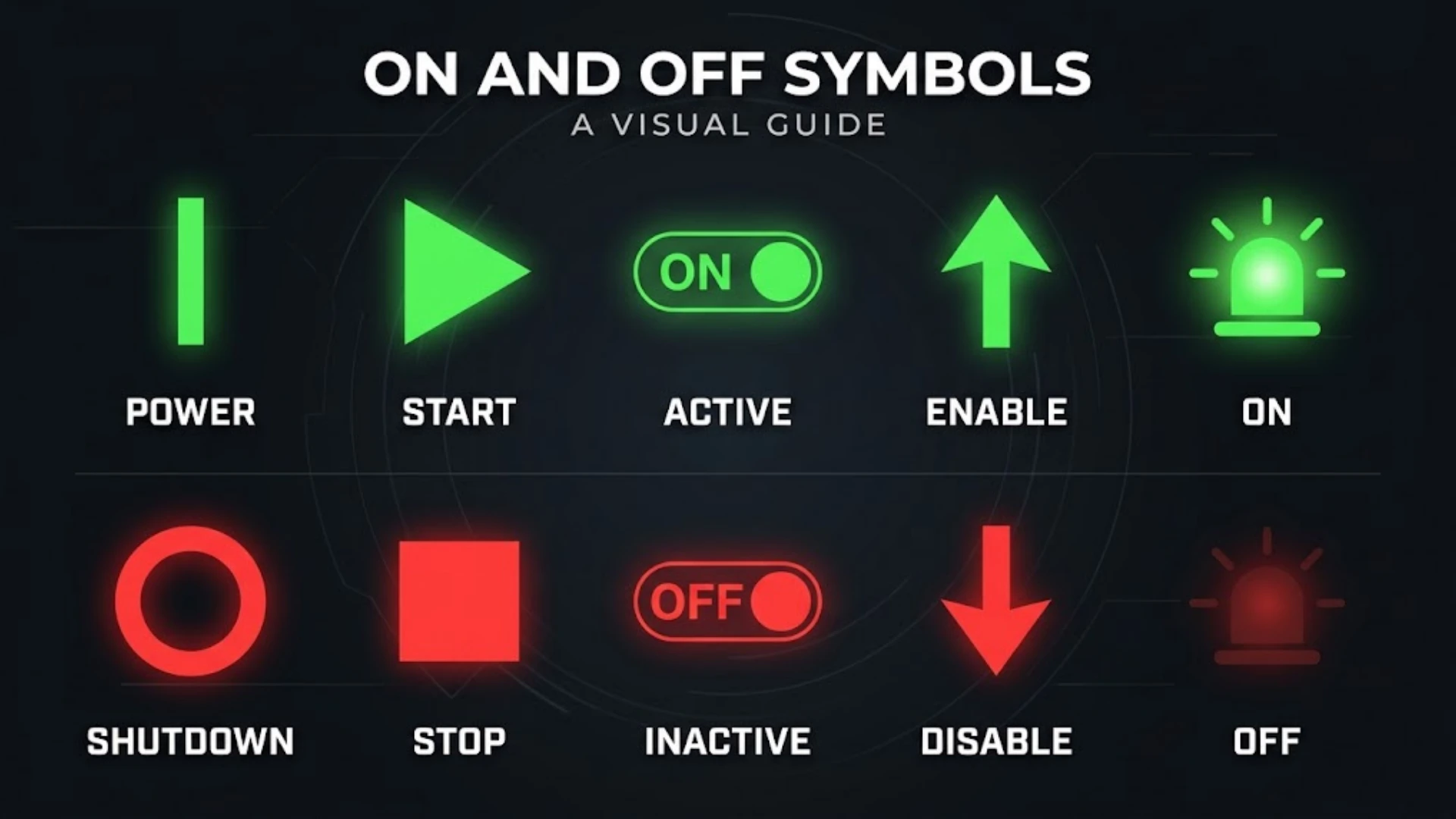
Have you ever looked at an electrical switch and wondered whether the circle or the line means ON? You’re not alone. These small markings appear on almost every electronic device, yet many people still confuse their meanings.
The vertical line (I or 1) means ON, while the circle (O or 0) means OFF. Manufacturers use these markings to show whether a device or electrical control is active or inactive. You’ll find them on computers, televisions, washing machines, power strips, and industrial equipment.
However, there’s more to these markings than two simple shapes. The universal power symbol (⏻), standby symbol (⏼), and other power-related icons communicate different functions. Some indicate an active power state, while others identify standby or low-power operation.
In this guide, you’ll learn what the main on and off symbols mean, how to recognize them, where manufacturers use them, and how they relate to electrical circuits. You’ll also discover their history, international standards, and practical differences.
What Are On and Off Symbols?
On and off symbols are visual markings that identify power controls and electrical operating states. They help you understand whether a device is switched on, switched off, or placed in another operating mode.
Instead of printing the words ON and OFF on every product, manufacturers often use simple symbols. These markings save space and make controls easier to recognize across different languages.
For example, a small rocker switch on a power strip might display an I on one side and an O on the other. The I identifies the ON position, while the O identifies OFF.
You’ll encounter these electrical power symbols in several places, including:
- Smartphones and computers
- Television sets and remote controls
- Washing machines and microwaves
- Desktop monitors and laptop chargers
- Power strips and extension cords
- Industrial machines and electrical control panels
- Smart home equipment and wireless devices
The symbols also connect to basic ideas in binary notation and digital logic. In simple terms, the numbers 1 and 0 represent two different states. This relationship helps explain why a line represents ON and a circle represents OFF.
On and Off Symbols and Their Meanings
Although manufacturers use several power-related markings, four symbols deserve particular attention. Each has a different meaning or function.
| Symbol | Name | Meaning |
| I | Line or ON symbol | Power ON |
| O | Circle or OFF symbol | Power OFF |
| ⏻ | Universal power symbol | Power control |
| ⏼ | Standby symbol | Standby or low-power function |
These symbols may look similar, but they don’t always perform the same job. Understanding their differences helps you operate devices correctly.
Vertical Line Symbol (I) – Meaning of ON
I is the familiar power ON symbol found on many electrical switches and appliances. It represents the number one in simplified binary notation.
When you see this marking on a conventional two-position power switch, it identifies the ON position. Moving the switch to this position activates the relevant power function.
The vertical line is common on:
- Computer power supplies
- Power strips
- Household appliances
- Electrical control panels
- Audio equipment
- Industrial machinery
You may also see the line displayed as | rather than the letter I. Both are commonly used to represent the ON marking in everyday descriptions.
Remember: If a switch displays I and O, choose I for ON and O for OFF.
Circle Symbol (O) – Meaning of OFF
O is the power OFF symbol. It represents zero in binary notation and identifies the OFF position on many conventional switches.
A circle suggests a closed or inactive state in the visual language of power markings. However, its standardized meaning as an OFF marking comes from its use as the zero symbol, not from a universal rule that every circle-shaped icon means power is disconnected.
You’ll commonly find O on:
- Rocker switches
- Extension cords
- Computer power supplies
- Electrical appliances
- Generators
- Industrial equipment
When you move a standard I/O switch to O, the controlled function switches off.
Keep in mind that turning a device off doesn’t always disconnect it completely from its electrical supply. Some devices retain standby power or other active functions.
Universal Power Symbol (⏻) – Combined ON and OFF Symbol
⏻ is the familiar universal power symbol found on countless electronic devices. It combines a vertical line with an incomplete circle.
Unlike the individual I and O markings, this combined icon generally identifies a power control. You’ll often find it on buttons that turn devices on, initiate shutdown, or switch between operating states.
Common examples include:
- Smartphone power buttons
- Laptop power controls
- Television sets
- Gaming consoles
- Bluetooth speakers
- Computer monitors
- Wireless headphones
Its exact behavior depends on the equipment. A quick press might wake a device, while holding the button could initiate a shutdown.
The symbol identifies the power-control function rather than guaranteeing that every press immediately disconnects electricity.
Standby Symbol (⏼) – Meaning and Function
⏼ is associated with standby operation. It identifies a power-related state in which equipment remains available without operating at full capacity.
For example, a television in standby mode may turn off its display while keeping its remote-control receiver active. The television can then respond when you press its remote power button.
Standby operation appears in:
- Televisions
- Audio systems
- Computer equipment
- Printers
- Electronic appliances
- Certain industrial devices
A standby device may still consume electricity. Therefore, standby shouldn’t automatically be treated as complete electrical isolation.
Which Symbol Means ON: Circle or Line?
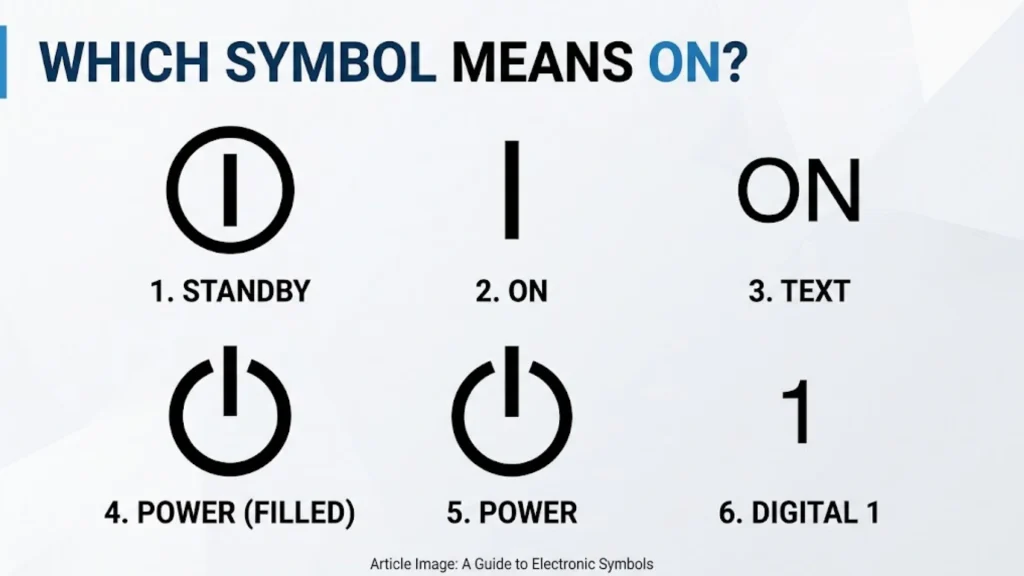
This is one of the most common questions people ask about on and off switch symbols. Fortunately, the answer is simple: the line means ON, and the circle means OFF.
However, understanding how these markings work makes them easier to recognize on different equipment.
Does the Line (I) Mean ON?
Yes. The vertical line represents the ON position on a standardized power switch.
When a conventional electrical switch moves to this position, it connects the relevant power supply or activates the controlled function.
For example, if your extension cord has I and O markings, pressing the side marked I turns the controlled output on.
Does the Circle (O) Mean ON or OFF?
The circle represents OFF, not ON.
On a standard power switch, selecting O disconnects the controlled power connection. The device may stop operating even if another part of its electronics remains energized.
This distinction matters because some electronic equipment uses separate standby circuits. Its main function can stop while a small amount of electricity continues to flow.
How to Remember the Difference Between I and O
You can remember these markings by connecting them to binary numbers:
- I = 1 = ON
- O = 0 = OFF
Think of I as the active position and O as the inactive position. This simple association works across many common electrical switches.
Types of On and Off Power Symbols
Not every power icon represents the same electrical condition. The International Electrotechnical Commission (IEC) maintains standardized graphical symbols for equipment, including several different power-control markings.
These standards help manufacturers communicate equipment functions consistently.
IEC 60417-5007 – Power ON Symbol
IEC 60417-5007 identifies the ON power symbol.
It indicates a connection to the mains supply, particularly when marking mains switches or their positions. Manufacturers also use it where equipment safety depends on identifying the ON state.
You’ll commonly see this marking on:
- Main electrical switches
- Industrial control equipment
- Household appliances
- Power supply units
- Electronic equipment with physical switches
The symbol helps users identify which position activates the controlled power connection.
IEC 60417-5008 – Power OFF Symbol
IEC 60417-5008 identifies the OFF power symbol.
It indicates disconnection from the mains supply at the relevant switch or switch position. This marking is particularly important when users need to identify whether equipment has been switched off.
For example, a machine’s main power switch may display this symbol beside its OFF position.
The distinction is important for equipment safety. Switching off one control doesn’t necessarily isolate every electrical component inside a machine.
IEC 60417-5009 – Standby Symbol
IEC 60417-5009 identifies standby operation.
This symbol marks a switch or control that places equipment into a standby condition. It can also identify a low-power state.
A television provides a useful example. Its screen may turn off while its remote-control receiver remains active.
This arrangement allows the television to respond when you press the remote’s power button.
IEC 60417-5010 – Combined ON/OFF Switch Symbol
IEC 60417-5010 identifies an ON/OFF push-push switch.
This marking is used when a switch has two stable positions. One position represents ON, while the other represents OFF.
For example, a rocker switch may remain in its selected position after you press either side.
Unlike a momentary button, this type of switch doesn’t automatically return to its original position.
IEC 60417-5011 – ON/OFF Push-Button Symbol
IEC 60417-5011 identifies a particular ON/OFF push-button arrangement.
Its operation differs from a conventional latching switch. In this arrangement, OFF is stable, while the ON position remains active only while the button is depressed.
This distinction is useful when identifying controls on specialized electrical equipment.
The IEC symbol descriptions and their technical applications are documented in equipment-symbol references. You can compare them through the OMRON Symbols Glossary, Philips Controls, and the IEC graphical-symbol reference.
OMRON Healthcare – OMRON Healthcare, Inc.+2
Difference Between Power ON, Power OFF, and Standby Symbols
ON, OFF, and standby describe different operating conditions. Understanding these differences helps you avoid assuming that every inactive-looking device has stopped using electricity.
| Feature | ON | OFF | Standby |
| Operating condition | Active | Main function inactive | Low-power condition |
| Main functions | Available | Usually unavailable | Usually limited |
| Electricity use | Normal operating consumption | Depends on the switching arrangement | Usually reduced |
| Typical marking | I | O | IEC 60417-5009 |
| Example | Running television | Main power disconnected | Television waiting for remote input |
Does Standby Mean the Device Is Completely OFF?
No. Standby and complete power disconnection are different conditions.
A standby device can retain enough electrical power to perform limited functions. These may include receiving remote-control signals, maintaining a clock, or waiting for a scheduled operation.
Consider a television with a standby indicator. The display remains dark, but the internal receiver stays ready for your next command.
Other examples include:
- Printers waiting for print jobs
- Audio systems responding to remote controls
- Computers maintaining selected wake-up functions
- Smart devices waiting for network commands
If you need to disconnect equipment completely, follow its manufacturer’s instructions. Depending on the design, that may require using a main isolating switch or disconnecting the power cord.
What Is the Difference Between Sleep Mode and Standby?
Sleep mode and standby both reduce power consumption. However, their functions depend on the equipment and operating system.
Sleep mode commonly refers to a computer state that suspends most activity while preserving enough information to resume work quickly.
Standby mode is a broader term for a low-power condition in which equipment remains available for selected functions.
For example, a laptop may enter sleep mode when you close its lid. A television may enter standby after you press its remote-control power button.
The two terms sometimes overlap. Always check the device manual for its exact operating behavior.
Why Do Power Symbols Use a Line and Circle?
The line and circle aren’t random design choices. Their meanings connect to binary numbers and the early development of electrical switching.
Connection Between Power Symbols and Binary Code
The binary number system uses only two digits: 0 and 1.
Computers and digital circuits use these digits to represent information and logical states. In many basic control systems, 1 represents an active or true state, while 0 represents an inactive or false state.
The power markings follow a similar visual idea:
- The vertical line resembles 1.
- The circle resembles 0.
- The combined icon brings both markings together.
This makes the symbols easy to recognize without relying on written language.
However, binary logic and electrical power aren’t exactly the same thing. A digital circuit can use different voltage levels and conventions to represent logical states.
How Electrical Circuits Represent ON and OFF States
An electrical circuit needs a complete conductive path for current to flow.
A switch controls that path by connecting or interrupting an electrical connection.
Two basic circuit conditions explain this process.
Closed circuit: A complete electrical path allows current to flow when a suitable voltage source is present.
Open circuit: An interrupted electrical path prevents normal current flow through that break.
For example, a simple battery-powered flashlight uses a switch to control its circuit. Closing the switch completes the path and lights the bulb. Opening the switch interrupts the path and turns the light off.
Simple circuit concept:
CLOSED CIRCUIT (ON)
Battery (+) ─── Closed Switch ─── Bulb ─── Battery (-)
Current flows
OPEN CIRCUIT (OFF)
Battery (+) ─── Open Switch Bulb ─── Battery (-)
Current stops
These examples describe a basic circuit. Real equipment may use electronic switches, relays, transistors, and control circuits instead of a simple mechanical contact.
Why the Universal Power Symbol Combines I and O
The combined power icon brings the two familiar markings into one compact design.
The circle represents 0, while the vertical line represents 1. Together, they communicate a control associated with changing the power state.
This design also solves a practical problem. A device manufacturer can use one recognizable icon instead of printing separate ON and OFF labels in multiple languages.
The Museum of Modern Art (MoMA) documents the history of this design as an IEC power symbol dating to 1973. Its historical description explains how the combined marking developed from the earlier line and circle symbols.
MoMA+1
History of On and Off Symbols
Modern power icons developed alongside electrical technology. Their history reflects a growing need for simple, consistent markings that people could understand across different countries.
Early Electrical Switches and Power Markings
Early electrical controls often used written words such as ON and OFF.
These labels were easy to understand for people who spoke the language used on the equipment. However, manufacturers faced a problem when selling products internationally.
A switch labeled in English might confuse someone who couldn’t read English. Manufacturers needed a more widely recognizable alternative.
Introduction of Binary-Inspired Power Symbols
The line and circle provided a practical solution.
Engineers adopted visual markings associated with 1 and 0 to represent the two positions of a power switch.
These symbols were compact and easy to print on equipment. They also reduced dependence on written instructions.
Over time, the markings became familiar across consumer and industrial electronics.
International Standardization of Power Symbols
The International Electrotechnical Commission (IEC) develops international standards for electrical and electronic technologies.
Its IEC 60417 database contains graphical symbols used on equipment. These symbols identify controls, connections, operating conditions, and other technical functions.
Some important power-related references include:
| IEC reference | Symbol name | Purpose |
| 5007 | ON (power) | Identifies the ON condition |
| 5008 | OFF (power) | Identifies the OFF condition |
| 5009 | Standby | Identifies standby operation |
| 5010 | ON/OFF (push-push) | Identifies a two-position switch |
| 5011 | ON/OFF (push button) | Identifies a particular push-button arrangement |
These references help manufacturers maintain consistency across product categories.
For additional background, see the IEC symbol information published by Philips.
Philips+1
How Power Symbols Became Common on Modern Devices
As electronic equipment became more common, manufacturers needed familiar controls for increasingly complex products.
The power symbol spread across computers, televisions, audio equipment, and household appliances.
Today, it appears on physical buttons, touchscreen interfaces, remote controls, and digital menus.
Its simple design remains useful because people can recognize the basic function without reading a long label.
Where Are On and Off Symbols Used?
You’ll find on and off icons on almost every category of modern electronic equipment. Although their appearance may vary, their main purpose remains the same: identifying power controls.
Smartphone and Mobile Device Power Buttons
Smartphones commonly display the universal power icon on their physical side buttons or software interfaces.
However, the button’s behavior depends on the operating system and device manufacturer.
A short press may:
- Turn the screen off
- Wake the screen
- Lock the phone
- Activate a configured shortcut
Holding the button may display a shutdown or restart menu.
Some smartphones also use the same physical button for fingerprint recognition or voice-assistant functions.
Computer and Laptop Power Symbols
Desktop computers and laptops commonly use the universal power symbol.
On desktop computers, you’ll usually find it on the front panel. Some power supplies also have a separate I/O switch on their rear side.
Laptops often use a dedicated power button or combine it with another keyboard function.
Common power-related actions include:
- Starting the computer
- Shutting down the operating system
- Entering sleep mode
- Waking the computer
- Restarting the system
Remember that pressing a computer’s power button doesn’t always immediately disconnect its electrical supply.
Television and Remote Control Power Symbols
Televisions commonly use the universal power icon on their physical controls and remote controls.
Pressing the button usually turns the television on or places it into standby.
The remote may continue communicating with the television even when the display is off.
Some models also include a separate mechanical power switch. Check the manual if you need to know whether that switch disconnects the mains supply.
Household Appliances
Household appliances use different electrical power symbols to make their controls easier to understand.
Examples include:
| Appliance | Common power-control use |
| Washing machine | Starts or stops the appliance’s power functions |
| Microwave | Activates or deactivates the control system |
| Refrigerator | Controls selected electrical functions |
| Air conditioner | Turns the unit on or off |
| Coffee maker | Controls heating and brewing operation |
| Electric fan | Activates the motor and speed controls |
Not every appliance uses the same icon. Some manufacturers use words, illuminated indicators, touch controls, or rotary switches.
Gaming Consoles and Electronic Accessories
Gaming consoles, Bluetooth speakers, headphones, and other wireless accessories also use power markings.
For example, a Bluetooth speaker may require a long press to turn on or off. A quick press might control playback instead.
Wireless headphones may use a power button that also handles pairing.
These examples show why you should understand the button’s function rather than assume every power-related control behaves identically.
Electrical Switches and Power Strips
Power strips commonly use rocker switches with I and O markings.
These switches control the electrical supply to the connected outlets.
A typical arrangement looks like this:
- I identifies the ON position.
- O identifies the OFF position.
- An indicator light may show whether the strip is receiving power.
Some power strips also include surge protection and overload protection. Their indicator lights may represent those functions rather than simply showing whether the switch is on.
Industrial Machines and Control Panels
Industrial equipment uses standardized markings to help operators identify important controls.
These include:
- Main power switches
- Machine operating controls
- Control-panel indicators
- Motor switches
- Power supply controls
- Equipment isolation devices
Clear markings matter in industrial environments because operating the wrong control can interrupt production or create safety risks.
The ABB Pilot Devices Guide discusses standardized graphical markings for machine-operation controls and electrical equipment.
ABB Library
Smart Home Devices
Smart home products use power controls in both physical and digital forms.
For example, a smart plug may have a physical power button and an ON/OFF control inside its mobile application.
Smart lighting systems also use virtual power icons to control bulbs remotely.
Other examples include:
- Smart speakers
- Wireless security cameras
- Automated lighting
- Smart thermostats
- Home automation panels
Voice assistants may also activate these devices without requiring you to press a physical button.
On and Off Symbols in Electrical Wiring and Circuit Diagrams
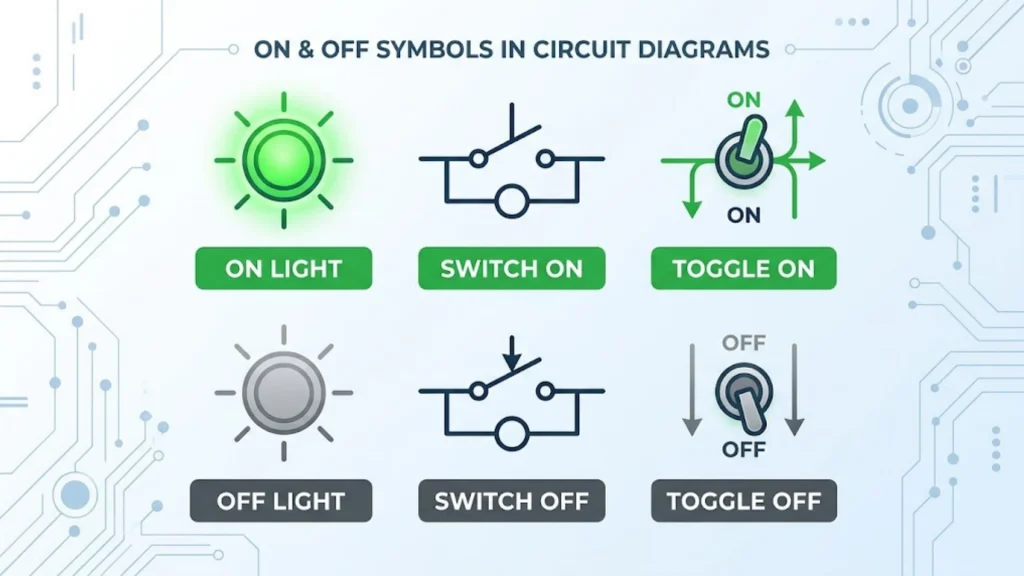
On and off symbols in electrical wiring have a slightly different purpose from the icons found on everyday power buttons.
Electrical diagrams use standardized markings to show how components connect and control current. These diagrams help electricians, engineers, and maintenance workers understand how an electrical system operates.
Open Switch Symbol and Its Meaning
An open switch represents an interrupted electrical connection.
When a switch is open, its contacts don’t form a complete conductive path. As a result, current normally cannot flow through that part of the circuit.
You’ll see open-switch representations in:
- Electrical schematics
- Circuit diagrams
- Wiring illustrations
- Technical manuals
- Equipment troubleshooting documents
For example, a basic light switch in its open position interrupts the circuit and turns the connected light off.
Closed Switch Symbol and Its Meaning
A closed switch completes the electrical path between its contacts.
When a suitable power source is connected, current can flow through the circuit.
A closed switch is commonly associated with an active circuit, although the actual equipment may still have other conditions that prevent operation.
For example, closing a simple flashlight switch completes the circuit and allows electricity to power its bulb.
On and Off Symbols in Circuit Diagrams
Circuit symbols represent electrical components and their connections in a simplified drawing.
Instead of illustrating every wire and internal part realistically, engineers use standardized graphical markings.
Common components represented in circuit diagrams include:
- Batteries and power sources
- Switches and push buttons
- Resistors and capacitors
- Lamps and electrical loads
- Ground connections
- Fuses and protective devices
- Motors and transformers
These symbols make complicated electrical systems easier to understand.
On and Off Symbols in Wiring Diagrams
A wiring diagram shows how electrical components connect through wires and terminals.
It may identify power supplies, switches, control devices, and electrical connections.
For example, a wiring diagram for a household appliance might show how its main switch connects to the power supply and internal control board.
Wiring diagrams are useful for:
- Installing electrical equipment
- Identifying electrical connections
- Understanding switch positions
- Diagnosing electrical faults
- Maintaining machinery
- Following manufacturer instructions
Always use the correct wiring diagram for the specific equipment model.
Difference Between an Open Circuit and a Closed Circuit
An open circuit and a closed circuit describe two basic electrical conditions.
| Feature | Open Circuit | Closed Circuit |
| Electrical path | Interrupted | Complete |
| Current flow | Normally stops | Can flow |
| Switch condition | Open | Closed |
| Connection | Broken at a point | Conductive path completed |
| Simple example | Light switch OFF | Light switch ON |
Important: An open circuit doesn’t necessarily mean the entire device is switched off. Other branches of a larger electrical system may remain active.
Similarly, a closed circuit doesn’t guarantee that a device will operate. The circuit also needs a suitable power source and functioning components.
Other Power-Related Symbols You Should Know
Electronic devices use several icons that look similar to power controls. However, restart, reset, sleep, and emergency-stop functions have different purposes.
Understanding these differences prevents confusion when operating unfamiliar equipment.
Restart Symbol
The restart symbol commonly uses a circular arrow.
It represents an action that starts a device or system again after its current operation stops.
Computers, smartphones, routers, and other electronic equipment offer restart options.
Restarting is useful when:
- An application stops responding.
- A device experiences a temporary software problem.
- An update requires a reboot.
- Network equipment needs to reconnect.
- System changes require a fresh startup.
Restarting doesn’t necessarily disconnect the device from its electrical supply.
Reset Symbol
A reset control returns a device or system to a defined state.
Its exact function depends on the product.
For example, a router’s reset button may restore its factory settings. A different device might use reset to clear an error or restart an internal controller.
Don’t confuse reset with ordinary power switching.
A reset operation can erase saved settings or configurations. Always check the manufacturer’s instructions before using it.
Sleep Mode Symbol
A crescent moon is commonly used to represent sleep mode.
You’ll often find this icon in computer interfaces, smartphones, and other electronic devices.
Sleep mode reduces activity while allowing the device to resume operation more quickly than a complete shutdown.
For example, a laptop can enter sleep mode when you close its lid. Opening it again may restore your previous session.
Energy-Saving Symbol
Energy-saving icons indicate functions designed to reduce electricity consumption.
Their appearance varies between manufacturers. Some products use leaves, eco labels, or other simplified graphics.
You may find these markings on:
- Air conditioners
- Refrigerators
- Washing machines
- Monitors
- Heating systems
- Smart home equipment
An energy-saving setting may reduce performance, adjust operating temperatures, or change how frequently a device runs.
Emergency Power Shutoff Symbol
Emergency shutoff controls allow operators to stop equipment quickly when a dangerous situation occurs.
They are common in industrial machinery, manufacturing facilities, and specialized equipment.
However, an emergency stop isn’t simply another power button.
An emergency-stop control is designed to stop a hazardous machine operation under specified conditions. Its function and reset procedure depend on the machine’s safety design.
Never assume that an ordinary ON/OFF switch provides the same protection.
Power Status Indicator
Power status indicators show whether equipment is operating, waiting, charging, or experiencing a particular condition.
Manufacturers often use LED lights for this purpose.
For example:
- A steady light may indicate normal operation.
- A blinking light may indicate activity or a warning.
- An amber light may identify standby or another special state.
- A red light may indicate an error or fault.
These meanings aren’t universal. Always check the product manual because manufacturers assign different meanings to indicator colors and blinking patterns.
How to Identify ON and OFF Positions on Different Switches
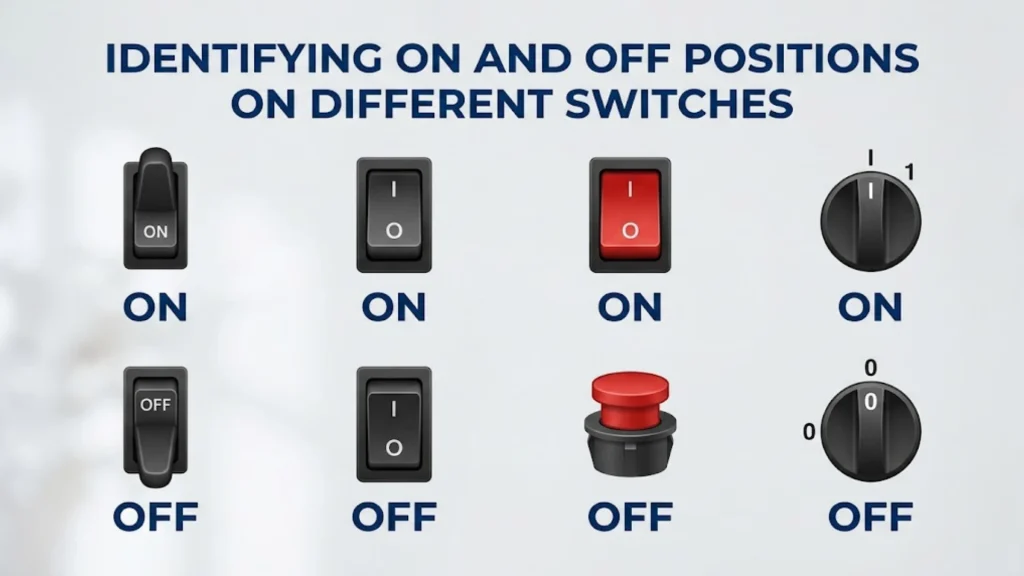
Although power symbols are standardized, switches don’t all operate in the same way. Their physical design determines how you select each position.
Rocker Switches With I and O Markings
Rocker switches have a movable surface that tilts when you press one side.
You’ll commonly find them on power strips, household appliances, and electrical equipment.
Most conventional I/O rocker switches follow this arrangement:
- Press the I side for ON.
- Press the O side for OFF.
Some models include a small indicator light to show their operating condition.
Toggle Switches With ON and OFF Labels
Toggle switches use a small lever that moves between different positions.
Some display written ON and OFF labels. Others use standardized power markings.
Before operating an unfamiliar toggle switch, check its labels and the equipment instructions. Industrial systems may use additional positions for automatic or manual operation.
Push-Button Power Switches
Push-button controls activate a function when you press them.
Some buttons remain in their selected position. Others return automatically after you release them.
A computer power button, for example, may use a short press for sleep or wake functions. A longer press may trigger a shutdown or force the system off.
The result depends on the device’s hardware and software settings.
Rotary Power Switches
Eaton T0-4-153/E Rotary Cam Switch
Rotary switches use a knob that turns between several positions.
You may see them on generators, appliances, machinery, and electrical control panels.
Common markings include:
- OFF
- ON
- AUTO
- LOW
- HIGH
Some switches also use numbers to identify different operating levels.
Power Symbols on Digital Touchscreens
power off and other icons on a smartphone screen
Modern devices often display power controls on their screens.
These electronic device icons may appear in system menus, quick settings, or shutdown interfaces.
For example, a smartphone may display power-off, restart, and emergency options after you hold its physical power button.
Touchscreen icons perform the same general communication role as physical markings. However, their functions may depend on the software.
On and Off Symbols Copy and Paste
If you need on and off symbols for text, documents, presentations, or digital designs, the following characters are useful.
| Symbol | Description | Copy and Paste |
| I | Power ON marking | I |
| O | Power OFF marking | O |
| ⏻ | Power symbol | ⏻ |
| ⏼ | Power ON-OFF symbol | ⏼ |
| 1 | Binary ON value | 1 |
| 0 | Binary OFF value | 0 |
| ○ | Open circle character | ○ |
| | | Vertical line character | \| |
Note: These are text characters, not all exact reproductions of the official IEC graphical artwork. Their appearance may change depending on your font, operating system, or application.
How to Copy and Paste Power Symbols
You can copy these characters and use them in many digital applications.
Follow these simple steps:
- Find the symbol you want to use.
- Select the character.
- Press Ctrl + C on Windows or Command + C on Mac.
- Open your document, message, or design application.
- Place your cursor where you want the symbol.
- Press Ctrl + V or Command + V to paste it.
You can use these characters in:
- Microsoft Word
- Google Docs
- PowerPoint presentations
- Website content
- Social media graphics
- Digital notes
- Educational materials
If a symbol appears as an empty box, your selected font or application may not support that character.
Are On and Off Symbols Universal?
Many on and off symbols are internationally standardized, but not every power-related icon has one universal meaning.
The IEC develops graphical standards that help manufacturers identify equipment functions consistently.
These markings are especially useful when products are sold in countries with different languages.
Consider a computer manufactured in one country and sold in another. Its power button can use the same recognizable symbol without requiring a translated label.
However, some differences still exist.
Manufacturers may use:
- Standardized IEC markings
- Written ON and OFF labels
- Customized power icons
- Touchscreen controls
- Device-specific indicator lights
The meaning of a particular icon can also depend on its location and surrounding controls.
For example, a moon symbol might represent sleep mode on a computer but a nighttime operating setting on another appliance.
Therefore, international standardization improves recognition, but it doesn’t eliminate the need to read technical instructions.
Electrical Safety When Using On and Off Switches
Understanding power symbols is useful, but safe operation matters even more.
Electrical switches control potentially dangerous equipment. Incorrect operation can cause injuries, equipment damage, or electrical hazards.
Why You Should Identify the Correct Power Switch
Some equipment contains several switches with different functions.
A machine might have a main power switch, a motor control, and a separate emergency-stop button.
Operating the wrong control could interrupt an important process or create an unsafe condition.
Before using unfamiliar equipment:
- Read the manufacturer’s instructions.
- Identify the main power control.
- Check the ON and OFF markings.
- Understand any additional operating positions.
- Ask qualified personnel when the controls aren’t clear.
Turning Off Electrical Equipment Safely
Switching a device off doesn’t always remove every electrical hazard.
Some equipment contains capacitors, batteries, backup supplies, or other components that retain energy.
For this reason, switching a machine to O doesn’t automatically make its internal components safe to touch.
If maintenance requires electrical isolation, follow the manufacturer’s procedure and applicable workplace safety rules.
Emergency Shutoff Controls
Emergency-stop systems help operators stop dangerous machine movements or processes.
They commonly appear on industrial machines, production equipment, and specialized electrical systems.
Their controls often use distinctive designs that make them easier to identify quickly.
However, pressing an emergency stop doesn’t necessarily disconnect every electrical supply. Some control circuits may remain energized.
Only trained personnel should perform maintenance or electrical isolation according to the appropriate safety procedure.
Why You Should Follow Manufacturer Instructions
Different devices can assign different functions to similar-looking buttons.
A short press, long press, or double press may produce different results.
The manufacturer’s manual explains these functions and identifies the correct operating procedure.
When working with electrical equipment, never rely on the icon alone if its function is unclear.
Frequently Asked Questions About On and Off Symbols
What Are the On and Off Symbols?
The two main power markings are I and O. The line (I) represents ON, while the circle (O) represents OFF. You’ll commonly find them on electrical switches, household appliances, and electronic equipment.
What Do the On and Off Symbols Mean?
They identify the operating positions of a power switch. I indicates an ON condition, while O identifies an OFF condition. The combined power icon generally identifies a control that changes the device’s power state.
Is the Circle or the Line ON?
The line means ON. The circle means OFF. You can remember their meanings by connecting I with 1 and O with 0 in binary notation.
Does a Circle Mean ON or OFF?
A circle used as the IEC OFF marking means OFF. However, a circle combined with a vertical line can represent a power control rather than the OFF position alone.
What Does the I/O Symbol Mean?
I/O markings identify the two positions of a conventional electrical power switch. I means ON, while O means OFF. You’ll often see these markings on power supplies and rocker switches.
What Is the Universal Power Button Symbol?
The universal power symbol is a broken circle with a vertical line extending into its upper section. It identifies a power-related control on computers, smartphones, televisions, and other electronic devices.
What Does the Standby Power Symbol Mean?
The IEC standby symbol identifies a control or condition that places equipment into a low-power standby state. The device may retain limited functions while consuming less electricity.
Is Standby the Same as OFF?
No. Standby allows selected electronic functions to remain available while the device uses reduced power. OFF generally indicates that the relevant power connection or function has been disconnected.
Why Does the Power Button Have a Circle and Line?
The design combines two familiar markings associated with binary notation. The circle represents zero, and the line represents one. Together, they create a compact visual marking for power control.
Who Created the Universal Power Symbol?
The International Electrotechnical Commission (IEC) is associated with the symbol’s standardization. The combined power symbol dates to 1973, according to the Museum of Modern Art’s historical record.
MoMA+1
Are On and Off Symbols Internationally Standardized?
Yes. IEC 60417 includes standardized ON, OFF, standby, and combined switch markings. Manufacturers use these standards to make equipment controls easier to recognize internationally.
What Do On and Off Symbols Mean in Electrical Wiring?
In electrical wiring, ON and OFF markings identify switch positions or equipment operating states. Circuit diagrams separately use open and closed switch representations to show whether an electrical path is interrupted or complete.
What Is the Difference Between an Open and Closed Switch?
An open switch interrupts the electrical path and normally stops current flow. A closed switch completes the conductive path and allows current to flow when a suitable power source is available.
Does the Number 1 Mean ON and 0 Mean OFF?
Yes, in the common binary convention, 1 represents an active or true state, while 0 represents an inactive or false state. The traditional I and O power markings follow this association.
Can a Device Still Use Electricity When It Is OFF?
Yes, depending on its design. Some devices retain standby circuits, clocks, network connections, or other low-power functions. A separate mains isolator or unplugging the device may be necessary for complete disconnection.
Where Can You Find On and Off Symbols?
You can find these markings on computers, smartphones, televisions, washing machines, microwaves, power strips, generators, industrial machinery, and many other electrical devices.
Conclusion: Understanding On and Off Symbols
Understanding on and off symbols makes everyday electronic equipment easier to operate. The vertical line (I) represents ON, while the circle (O) represents OFF. These simple markings help users identify power-switch positions without depending on written instructions.
The universal power symbol combines familiar elements into one recognizable control icon. Meanwhile, the IEC standby marking identifies a different operating condition in which equipment can remain available at reduced power.
Remember these important differences:
- I = ON
- O = OFF
- ⏻ = Power symbol
- IEC 60417-5009 = Standby
- IEC 60417-5010 = Combined ON/OFF push-push switch
Whether you’re using a smartphone, operating a household appliance, or reading an electrical diagram, knowing these symbols helps you understand how power controls work.

Hi, I’m Asher Monroe, a writer who believes that meaningful words have the power to inspire change and bring people closer to their dreams. I have always been fascinated by the beauty of quotes and the way a simple message can provide motivation, hope, and comfort.
I enjoy creating content around inspirational quotes, life lessons, success stories, and positive thoughts that help readers find encouragement in their everyday lives. My goal is to share words that connect with people and remind them of their inner strength.
Through my writing, I explore the ideas of personal growth, confidence, and the importance of staying inspired through every chapter of life.
I am the author of Words That Move the Soul and The Path of Endless Inspiration, two books focused on the power of wisdom, positivity, and meaningful thoughts.
 Sienna Brooks
 Rowan Sinclair Rowan Sinclair