
GD&T symbols are standardized graphical symbols used in engineering drawings to define the allowable variation in a part’s geometry. They help mechanical engineers, designers, machinists, and quality inspectors understand how a component should be manufactured and measured.
Geometric Dimensioning and Tolerancing (GD&T) communicates requirements for form, orientation, location, profile, and runout. These controls help teams understand how individual features relate to one another and how parts should fit together.
For example, a steel base plate may need a flat mounting surface and accurately positioned bolt holes. Basic dimensions alone might not communicate every geometric requirement clearly. Appropriate GD&T tolerances help define the acceptable variation for those features.
This guide covers GD&T symbols and meanings, common symbol types, Feature Control Frames, datum references, practical component examples, and applications in CNC machining and quality inspection. It also explains how to interpret drawings using the relevant engineering standard.
Important: GD&T rules depend on the standard specified on the drawing. ASME Y14.5 and the ISO Geometrical Product Specifications (GPS) framework are major references, but their rules aren’t interchangeable in every situation.
What Are GD&T Symbols and Their Meanings?
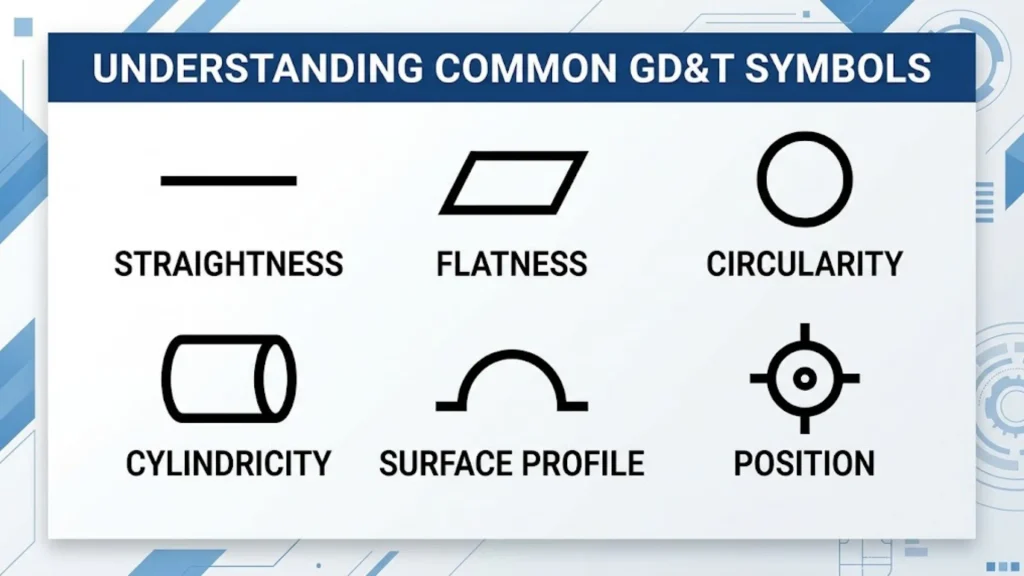
GD&T stands for Geometric Dimensioning and Tolerancing. It’s a system for defining the permitted variation in the geometry of manufactured parts.
In mechanical engineering drawings, GD&T symbols communicate requirements that ordinary length, width, height, and plus/minus dimensions may not fully describe.
A designer might specify the diameter of a shaft, for example. That size requirement doesn’t necessarily control whether the shaft is straight or whether its surface runs accurately around a datum axis. Separate geometric controls may be needed.
The main purpose of GD&T is to connect a component’s design requirements with its intended function.
Why GD&T Symbols Matter in Mechanical Design
GD&T in mechanical design helps engineers describe the geometry a component needs to function correctly. It also improves engineering communication between designers, manufacturers, and inspection teams.
Its practical benefits include:
- Clear design intent: Drawings communicate which geometric relationships matter.
- Assembly accuracy: Related features can be controlled to support proper fit.
- Dimensional accuracy: Appropriate controls define acceptable geometric variation.
- Quality control: Inspectors can evaluate features against stated requirements.
- Manufacturing planning: Machinists can plan setups and processes around datum references.
- Rework reduction: Clear requirements can prevent avoidable interpretation errors.
- Component interchangeability: Properly toleranced parts can be more consistently interchangeable when all relevant requirements are met.
GD&T doesn’t automatically guarantee better quality or lower costs. The designer must select suitable controls and realistic tolerances, and manufacturing and inspection processes must meet them.
GD&T and Traditional Tolerancing
Traditional tolerancing often uses dimensions with plus/minus limits. GD&T can supplement those dimensions by controlling geometric characteristics and relationships between features.
Consider a mounting plate with four bolt holes. Traditional dimensions can specify the distance between hole centers. GD&T can define the permitted variation in the hole pattern relative to the plate’s datum reference frame.
| Aspect | Traditional plus/minus tolerancing | GD&T |
| Primary purpose | Controls specified dimensional variation | Controls specified size and geometric variation |
| Feature relationships | May need additional notes or dimensions | Can explicitly define geometric relationships |
| Datum references | Not always used | Used when required by the geometric control |
| Complex geometry | Can require many dimensions | Can communicate complex geometric requirements more directly |
| Inspection | Depends on the specified dimensions | Depends on the specified geometric controls and applicable standard |
GD&T and traditional tolerancing differences are especially important when parts must fit, rotate, seal, or align with other components.
Neither method eliminates the need for sound engineering judgment. GD&T is most useful when its controls communicate functional requirements more clearly than dimensions alone.
GD&T Symbols Chart: Commonly Used GD&T Symbols
The top GD&T symbols are grouped by the geometric characteristics they control. Learning these groups makes GD&T symbols for beginners easier to understand.
The five main categories are form, profile, orientation, location, and runout.
AGI Leaders in GD&T
+1
| Category | GD&T symbol name | What it controls | Datum reference |
| Form | Straightness | Straightness of a line element or applicable derived median line | Not required |
| Form | Flatness | How closely a surface conforms to a plane | Not required |
| Form | Circularity (roundness) | Roundness of each circular cross-section | Not required |
| Form | Cylindricity | Form of the entire cylindrical surface | Not required |
| Profile | Profile of a line | A two-dimensional profile | Optional, depending on the requirement |
| Profile | Profile of a surface | A three-dimensional surface profile | Optional, depending on the requirement |
| Orientation | Angularity | A specified angular relationship to a datum | Required |
| Orientation | Perpendicularity | A 90-degree relationship to a datum | Required |
| Orientation | Parallelism | A parallel relationship to a datum | Required |
| Location | Position | The location of a feature relative to its theoretically exact position | Generally required for datum-based position control |
| Runout | Circular runout | Surface variation at individual cross-sections during rotation | Required |
| Runout | Total runout | Surface variation across the full controlled surface during rotation | Required |
Note: Concentricity and symmetry may appear on older drawings. They were removed from the ASME Y14.5-2018 symbol set. Always follow the standard and edition specified on the drawing.
GD&T Symbols for Shape and Form
Form tolerance controls the shape of a feature without requiring a datum reference. These controls help define whether a surface, line, or cylindrical feature stays within its permitted geometric limits.
What Does the Straightness Symbol Mean in GD&T?
The straightness symbol controls how much a specified line element or applicable derived median line may deviate from a perfect straight line.
Its exact interpretation depends on how the tolerance is applied. A surface-line straightness control differs from straightness applied to the derived median line of a feature of size.
For example, a long CNC shaft may need straightness control to limit bending or deviation along its length.
Straightness symbol — practical example:
Imagine a rod designed to fit inside a guide. If the rod bends too much, it may bind or fail to move smoothly. A straightness requirement defines the permitted deviation for the controlled feature.
Straightness doesn’t automatically control every other aspect of the rod. Diameter, surface finish, position, and other requirements may need separate specifications.
What Does the Flatness Symbol Mean in GD&T?
The flatness symbol controls how closely a surface conforms to a theoretically perfect plane.
The tolerance zone consists of two parallel planes separated by the stated tolerance value. The entire controlled surface must fit between those planes.
A steel base plate provides a useful example. If the plate supports a machine, excessive surface variation could affect mounting or alignment.
Flatness is a form control, so it doesn’t require a datum reference. However, flatness alone doesn’t establish the surface’s orientation or location relative to another feature.
A flat surface can still be tilted relative to the rest of a component. If the design also requires a specific relationship to another surface, an additional geometric control may be necessary.
What Is Circularity or Roundness in GD&T?
Circularity, also called roundness, controls the form of each circular cross-section of a surface.
In a simplified explanation, each controlled cross-section must fit between two concentric circles separated by the specified tolerance.
For example, a piston or cylindrical component may need circularity control to limit deviations from a true circular shape.
Circularity doesn’t control the full length of a cylinder as one combined surface. It also doesn’t establish the feature’s position relative to a datum axis.
Those distinctions matter when choosing between circularity, cylindricity, and runout.
What Does Cylindricity Control?
Cylindricity controls the form of the entire cylindrical surface rather than a single circular cross-section.
Its tolerance zone is formed by two coaxial cylinders separated by the stated tolerance. The controlled surface must remain within that zone.
This control can be useful for precision cylindrical components, including shafts and hydraulic-cylinder surfaces, when the full cylindrical form matters.
Cylindricity doesn’t require a datum reference. It combines several aspects of cylindrical form, but it doesn’t by itself define the surface’s position relative to another feature.
GD&T Symbols for Orientation
Orientation control defines the angular relationship between a feature and a datum. The three principal orientation controls are angularity, perpendicularity, and parallelism.
What Does Perpendicularity Mean in GD&T?
The perpendicularity symbol controls whether a surface, axis, or applicable feature is oriented at 90 degrees to a datum.
The requirement is more precise than simply labeling an angle as 90 degrees. The geometric tolerance defines the permitted deviation from the required orientation.
For example, a mounting bracket may have a vertical face that must sit perpendicular to its base. If that face tilts beyond the allowed tolerance, the bracket may not align correctly with the connected part.
Perpendicularity is particularly relevant to:
- Mounting faces.
- Machine-tool components.
- Structural brackets.
- Engine and equipment housings.
- Surfaces used to establish assembly alignment.
The correct tolerance depends on the function of the part and the requirements on the drawing.
What Does Parallelism Mean in GD&T?
The parallelism symbol controls the orientation of a surface, axis, or applicable feature relative to a datum.
For a surface control, the tolerance zone commonly consists of two parallel planes. The controlled surface must fit within those planes while maintaining the required parallel relationship to the datum.
Consider a machine slider that moves between two guiding surfaces. If the relevant surfaces aren’t parallel enough, movement may become uneven or the assembly may bind.
Parallelism controls orientation, not every aspect of feature location. A surface may be parallel to a datum but still sit too far away from it.
If the design needs to control both orientation and location, additional dimensions or geometric controls may be necessary.
What Is Angularity in GD&T?
Angularity controls a specified angle other than 90 degrees or 0 degrees relative to a datum.
The drawing establishes the theoretically exact angle using a basic dimension. The angularity tolerance then limits the permitted orientation variation.
A machined bracket with an angled face is one example. The face may need to meet a specific angle so that another component fits correctly.
Angularity is useful when the functional requirement depends on an angle that can’t be adequately described by a simple dimensional tolerance alone.
GD&T Symbols for Location
Location control defines where a feature must lie relative to its theoretically exact position or the relevant datum reference system.
What Does the Position Symbol Control in GD&T?
The position symbol controls the location of a feature relative to its true, theoretically exact position.
Position is frequently used for holes, pins, slots, and patterns of features. It can be especially useful when multiple features must align with matching components.
For example, a steel base plate may contain four holes for mounting a machine. Basic dimensions define the theoretically exact hole locations, while the position tolerance defines the permitted variation.
This can help control hole position tolerance in a way that supports assembly requirements.
The interpretation depends on the feature being controlled, the specified tolerance zone, the datum references, and any applicable modifiers.
Position Tolerance: A Simple Example
Imagine a mounting plate with four bolt holes.
The drawing defines:
- Datum A: The primary surface used to establish the main reference.
- Datum B: A secondary feature that helps establish the reference orientation.
- Datum C: A tertiary feature that completes the datum reference frame.
- Basic dimensions: The theoretically exact locations of the holes.
- Position tolerance: The permitted variation in the hole locations.
The inspector then checks whether the holes satisfy the stated position requirement using an appropriate inspection method.
This example illustrates the relationship between design intent, datum references, and geometric tolerances. The actual tolerance value must come from the engineering design, not from a universal recommended number.
Concentricity and Symmetry on Older Drawings
Concentricity and symmetry may still appear on legacy drawings, older training materials, and documents based on earlier standards.
Under ASME Y14.5-2018, both symbols were removed from the standard’s current set. That doesn’t mean an older drawing can be ignored. The applicable standard and edition still govern its interpretation.
For new designs, engineers often consider whether position, runout, profile, or another control better expresses the actual functional requirement.
The correct choice depends on what the component needs to do and what characteristic must be inspected.
GD&T Symbols for Runout
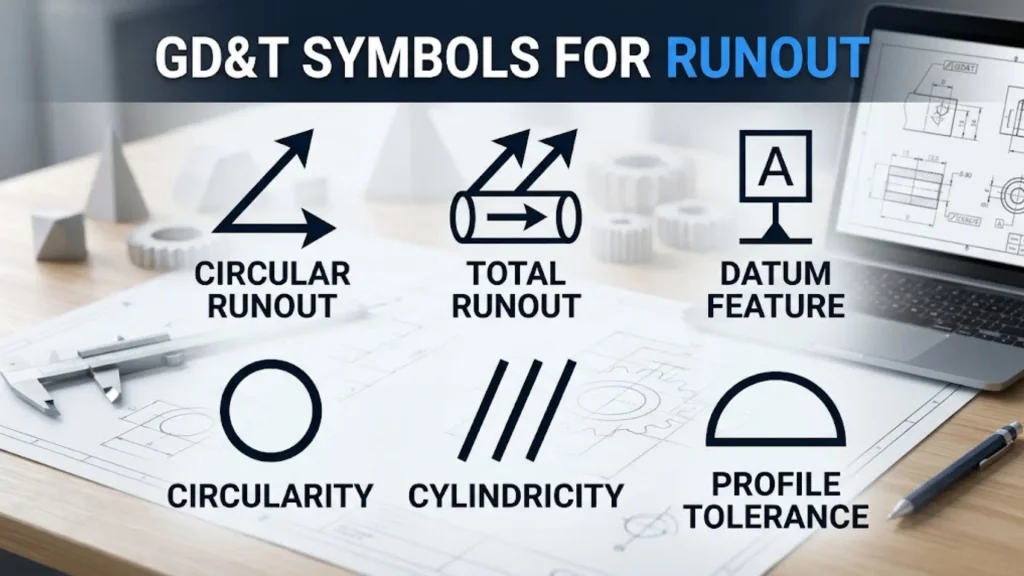
Runout controls are commonly used for surfaces associated with rotating components. They define allowable variation relative to a datum axis during rotation.
What Is Circular Runout?
Circular runout controls the variation of a surface at individual circular cross-sections as the part rotates around a datum axis.
An inspector may rotate the part around the specified datum axis and measure the surface with a dial indicator or another suitable method.
For example, a CNC shaft may have a surface that needs to run consistently around its axis. Excessive variation could affect how the shaft works with a bearing or another component.
Circular runout applies to individual cross-sections. It doesn’t control the entire surface in the same combined way as total runout.
What Is Total Runout?
Total runout controls surface variation across the entire specified surface as the part rotates around a datum axis.
It can be important for shafts, bearing seats, and other rotating components where the full surface must meet geometric requirements.
Imagine a gear shaft that supports several rotating components. Excessive geometric variation may affect alignment and contribute to vibration or uneven contact, depending on the design.
Total runout can help control the required relationship between the surface and the datum axis. However, it isn’t a substitute for every other requirement. Size, surface finish, and other geometric characteristics may still need separate controls.
Circular Runout vs. Total Runout
| Feature | Circular runout | Total runout |
| Measurement scope | Individual circular cross-sections | Entire specified surface |
| Main purpose | Controls variation at each section during rotation | Controls variation across the full surface during rotation |
| Typical application | Rotating cylindrical or circular features | Shafts and other surfaces requiring broader control |
| Datum reference | Required | Required |
The selection should reflect the functional requirement, not simply a preference for a tighter-looking drawing.
What Is a Feature Control Frame in GD&T?
A Feature Control Frame (FCF) is a rectangular box divided into compartments. It communicates the geometric tolerance applied to a feature.
Understanding the GD&T Feature Control Frame is essential for engineering drawing interpretation because the frame brings the symbol, tolerance value, modifiers, and datum references together.
How to Read a GD&T Feature Control Frame
Read the compartments from left to right. A typical frame may contain:
- Geometric characteristic symbol: Identifies the control, such as position or perpendicularity.
- Tolerance value: Specifies the permitted geometric variation.
- Tolerance modifier: May specify a material condition, when applicable.
- Datum references: Identify the datum features used to establish the reference system.
A simplified position frame might be written as:
⌖ | ⌀0.20 | A | B | C
This is an illustrative notation for a position control with a diameter tolerance zone of 0.20 and datum references A, B, and C. The actual drawing format, units, modifiers, and interpretation depend on the governing standard.
The diameter symbol indicates a cylindrical tolerance zone in this example. The datum references establish the reference system used to evaluate the feature’s position.
Important: A tolerance value such as 0.20 isn’t a universal GD&T recommendation. The designer must select a suitable value based on function, manufacturing capability, and inspection requirements.
Understanding Datum References in GD&T
A datum reference connects a geometric requirement to a defined reference feature or reference system.
In a typical three-datum setup:
- Datum A often serves as the primary reference.
- Datum B serves as the secondary reference.
- Datum C serves as the tertiary reference.
These letters are examples, not fixed assignments. A drawing can assign different datum letters to different features.
The order matters because primary, secondary, and tertiary references establish the datum reference frame according to the applicable standard.
For example, when inspecting a mounting plate, an inspector may use its base surface as Datum A and two additional features as Datums B and C. This creates a repeatable reference system for checking the hole pattern.
A datum feature is a physical feature on the part. A datum is the theoretically exact reference derived from that feature under the applicable rules.
This distinction helps prevent errors in part alignment, setup, and inspection.
GD&T Tolerance Zone Explained
A tolerance zone defines the space within which a controlled feature must lie.
The zone’s shape depends on the geometric control. For example:
- Straightness may use two parallel lines or a cylindrical zone, depending on the application.
- Flatness uses two parallel planes.
- Circularity uses two concentric circles in a cross-section.
- Cylindricity uses two coaxial cylinders.
- Position may use a cylindrical zone when a diameter tolerance is specified.
- Profile controls use zones based on the theoretically exact profile.
The feature must satisfy the applicable requirement within the tolerance zone.
A smaller tolerance generally restricts variation more tightly, which may increase manufacturing and inspection difficulty. The right tolerance is the one that satisfies the part’s functional requirements without imposing unnecessary restrictions.
GD&T Symbols With Real-World Examples
The following examples show how GD&T symbols with examples connect engineering requirements to real components. The correct geometric control depends on the feature and its function.
| Component | Possible GD&T controls | Practical purpose |
| Steel base plates | Flatness, position, perpendicularity | Controls mounting surfaces and hole locations |
| Hydraulic cylinders | Cylindricity, straightness, runout where applicable | Controls specified cylindrical geometry and alignment |
| Engine blocks | Position, perpendicularity, profile | Controls selected holes, faces, and complex surfaces |
| Pistons | Circularity, cylindricity, and other specified controls | Controls relevant geometric characteristics |
| Bearings and bearing seats | Position, runout, cylindricity where appropriate | Supports the required fit and alignment |
| Gear shafts | Circular runout, total runout, position | Controls specified rotating surfaces and features |
| Brackets | Perpendicularity, parallelism, position | Helps control mounting relationships |
| Machine sliders | Flatness, parallelism, straightness where appropriate | Controls guiding surfaces and movement |
| Rods | Straightness, size tolerances | Controls the geometry needed for their intended use |
| Structural components | Profile, position, perpendicularity | Controls interfaces and selected geometric relationships |
These examples aren’t universal design instructions. A component may need several controls, and not every listed control belongs on every part.
The purpose of GD&T symbols in mechanical engineering is to express the requirements that matter to the component’s function.
How GD&T Is Used in CNC Machining
GD&T applications in CNC machining connect the engineering drawing to machining setups, tool paths, workholding, and inspection.
A machinist needs to know not only the required size of a feature but also how its geometry relates to the rest of the part.
For example, a shaft may meet its diameter requirement while still having excessive runout relative to its datum axis. Size inspection alone wouldn’t establish whether the runout requirement is satisfied.
How GD&T Supports Manufacturing Accuracy
GD&T can support manufacturing accuracy by defining acceptable geometric variation in a way that relates to part function.
It helps teams determine:
- Which surfaces should establish the setup.
- How features should relate to one another.
- Which geometric characteristics need inspection.
- Whether the manufacturing process can achieve the specified tolerances.
- How to evaluate a nonconforming feature.
The result depends on the entire process. Correct drawings, capable equipment, appropriate tooling, skilled operators, and reliable measurement all matter.
GD&T in CAD Drafting
In CAD drafting, designers use geometric tolerances, datum symbols, dimensions, and Feature Control Frames to communicate part requirements.
Modern CAD systems may support CAD tolerancing and model-based definition, depending on the software and workflow.
Good practice includes:
- Using the correct symbol and callout for the intended control.
- Attaching the tolerance to the correct feature.
- Defining datum references where required.
- Checking that the drawing follows the specified standard.
- Reviewing the model and drawing for conflicting requirements.
- Making sure manufacturing and inspection teams can interpret the annotations.
GD&T symbols in technical drawings should communicate the design intent clearly. Adding extra controls without a functional reason can increase complexity and manufacturing cost.
GD&T for Quality Inspection
GD&T for quality inspection helps inspectors determine whether a part meets its specified geometric requirements.
Suitable inspection methods may include:
- Coordinate measuring machines (CMMs).
- Dial indicators and suitable fixtures.
- Surface plates and height gauges.
- Appropriate geometric gauges.
- Optical or other measurement systems when suitable.
The correct equipment depends on the feature, tolerance, measurement uncertainty, and applicable inspection procedure.
A CMM can measure many geometric characteristics, but its use doesn’t automatically guarantee a valid result. The measurement strategy, datum alignment, probing method, calibration, and uncertainty all matter.
Benefits of Learning GD&T
Benefits of learning GD&T extend beyond memorizing symbols. The real value comes from understanding how the controls apply to actual parts and drawings.
Better Engineering Communication
GD&T helps designers, machinists, and inspectors work from a shared set of geometric requirements.
Clear callouts can reduce confusion about which features matter and how their relationships should be evaluated.
Improved Assembly Accuracy
Appropriate geometric controls can support assembly accuracy by defining relationships between mating features.
For example, position tolerances on a hole pattern may help a mounting plate align with a matching component.
More Effective Quality Control
When drawings clearly define geometric requirements, inspection teams can plan suitable measurements and compare results with the stated acceptance criteria.
This supports quality assurance and traceable technical documentation.
Reduced Rework and Avoidable Cost
Clear specifications can help prevent manufacturing errors caused by ambiguous drawings or misunderstood requirements.
However, excessively tight tolerances can create unnecessary cost. Effective GD&T requires balancing functional needs with manufacturing and inspection capability.
Support for Precision Engineering
GD&T is useful in precision manufacturing where geometric relationships influence the function of a component.
It helps communicate requirements for part geometry, dimensional variation, and component interchangeability when the design and manufacturing processes support those goals.
Which Industries Use GD&T?
GD&T is used in many areas of mechanical engineering and industrial production. The specific controls depend on the products, processes, and applicable standards.
Automotive Industry
In the automotive industry, GD&T may be applied to engine blocks, pistons, brackets, gear shafts, and mounting interfaces.
Designers use appropriate geometric controls to communicate requirements for features that must align, rotate, seal, or connect with other components.
Aerospace Industry
In aerospace manufacturing, engineering drawings may specify geometric requirements for machined components, structural interfaces, and precision assemblies.
The applicable standards and inspection requirements depend on the project and organization.
General Mechanical Engineering
GD&T is also relevant to machine tools, hydraulic equipment, industrial machinery, fixtures, and structural components.
It supports communication between mechanical design, manufacturing, and inspection teams.
Industry 4.0 and Digital Manufacturing
Industry 4.0 workflows increasingly connect design data, manufacturing systems, and inspection records.
Digital drawings and model-based definition can help transfer tolerancing information through the production process when the software, data formats, and procedures support it.
GD&T alone doesn’t create an automated manufacturing system. Reliable digital workflows also require compatible tools, controlled data, and sound quality processes.
GD&T Training and Courses for Beginners
GD&T training helps students and working professionals understand symbols, datum references, tolerance zones, and engineering drawings.
A good GD&T course for beginners should combine explanations with practical exercises rather than focus only on memorizing symbol names.
What Should a GD&T Training Program Cover?
Look for training that includes:
- The basics of Geometric Dimensioning and Tolerancing.
- Common symbols and their functions.
- Feature Control Frames.
- Datum references and datum reference frames.
- Form, profile, orientation, location, and runout controls.
- Interpretation of actual mechanical engineering drawings.
- Measurement and inspection examples.
- Exercises based on realistic components.
Who Should Learn GD&T?
GD&T can be useful for:
- Mechanical engineering students.
- Mechanical design professionals.
- CAD designers and drafters.
- CNC machinists and manufacturing engineers.
- Quality control and inspection professionals.
- QC engineers.
- Manufacturing and product development teams.
How GD&T Training Can Support Career Growth
Understanding GD&T can strengthen an engineer’s ability to read drawings, communicate requirements, and collaborate with manufacturing and quality teams.
These GD&T skills for mechanical engineers can be useful in roles involving design, production, inspection, and technical documentation.
Training providers, including organizations such as CADD Centre, may offer relevant courses. Check the provider’s current syllabus, instructor qualifications, practical exercises, and certification details before enrolling.
A certificate alone doesn’t demonstrate full competency. Hands-on projects, drawing interpretation, and practical experience are important for developing usable engineering skills.
Common GD&T Mistakes to Avoid
Even experienced professionals can misinterpret geometric controls when they read a drawing without checking its full context.
Avoid these common mistakes:
- Confusing size and form: A feature can meet its size tolerance but fail a separate form requirement.
- Using datums incorrectly: Datum references must reflect the intended functional relationship.
- Mixing standards: ASME and ISO rules can differ, so use the standard named on the drawing.
- Confusing circularity with cylindricity: One controls individual circular cross-sections; the other controls the entire cylindrical surface.
- Treating runout controls as interchangeable: Circular runout and total runout have different scopes.
- Over-tolerancing: Unnecessarily tight tolerances can increase cost without improving function.
- Ignoring inspection capability: Requirements should be measurable using an appropriate, reliable method.
- Assuming every control needs a datum: Form controls such as flatness and circularity don’t require datum references.
- Copying old symbols without checking the standard: Legacy drawings may contain controls removed from newer versions of a standard.
Frequently Asked Questions About GD&T Symbols
What are the most commonly used GD&T symbols?
Commonly encountered symbols include straightness, flatness, circularity, cylindricity, perpendicularity, parallelism, position, profile, circular runout, and total runout. The symbols used depend on the part’s design and function.
How do GD&T symbols work in mechanical design?
They communicate allowable geometric variation and relationships between features. Designers use them with dimensions, datum references, and Feature Control Frames to define the requirements that manufacturing and inspection teams must follow.
How do you read GD&T symbols in engineering drawings?
Identify the geometric characteristic, read the tolerance value and any modifiers, and then interpret the datum references and related dimensions. Always check the drawing’s specified standard.
What is a Feature Control Frame in GD&T?
A Feature Control Frame is a compartmented box that communicates a geometric tolerance requirement. It may contain a geometric characteristic symbol, tolerance value, applicable modifier, and datum references.
What are datum references in GD&T?
Datum references identify the reference features used to establish a datum reference frame. They help define how a controlled feature’s geometric relationship should be evaluated.
What does the straightness symbol mean in GD&T?
Straightness controls the permitted deviation from a straight line. Depending on its application, it can control a surface line element or the derived median line of a feature of size.
What does the flatness symbol mean in GD&T?
Flatness controls how closely a surface conforms to a theoretically perfect plane. The controlled surface must fit between two parallel planes separated by the specified tolerance.
What is circularity or roundness in GD&T?
Circularity, also called roundness, controls the form of each circular cross-section. It doesn’t control the full cylindrical surface as a single combined feature.
What does perpendicularity mean in GD&T?
Perpendicularity controls a feature’s orientation relative to a datum at 90 degrees. The specified tolerance defines the permitted geometric deviation.
What does parallelism mean in GD&T?
Parallelism controls the orientation of a feature relative to a datum. It defines how closely the controlled feature must maintain a parallel relationship.
What does the position symbol control in GD&T?
Position controls the location of a feature relative to its theoretically exact position. It is commonly used for holes, pins, slots, and feature patterns.
What is total runout in GD&T?
Total runout controls variation across an entire specified surface as a part rotates around a datum axis. It’s often relevant to shafts and other rotating components.
How does GD&T help reduce manufacturing rework?
Clear geometric requirements can reduce errors caused by ambiguous drawings and misunderstood feature relationships. Rework reduction still depends on appropriate tolerances, capable manufacturing processes, and effective inspection.
What is the difference between GD&T and traditional tolerancing?
Traditional plus/minus tolerancing controls specified dimensional variation. GD&T adds a systematic way to define geometric characteristics and relationships, which can better express certain functional requirements.
Where can I learn GD&T symbols and their applications?
Start with a reputable engineering reference and the standard relevant to your work. A structured training course with real drawings, measurement exercises, and practical projects can help you develop stronger skills.
Conclusion: Understanding GD&T Symbols in Practice
GD&T symbols provide a structured way to communicate the geometric requirements of manufactured parts. Understanding form, profile, orientation, location, and runout controls makes engineering drawings easier to interpret.
The most useful approach is to learn each symbol alongside its tolerance zone, datum requirements, and practical application. Practice with real components such as shafts, brackets, base plates, and engine parts to connect the theory with manufacturing work.
Always follow the engineering standard specified on the drawing, choose tolerances based on functional needs, and confirm that the requirements can be inspected reliably. These habits help turn GD&T knowledge into practical engineering skills.

Hi, I’m Sienna Brooks, and I believe that the right words can inspire, comfort, and empower people at every stage of life. For as long as I can remember, I’ve been drawn to meaningful quotes and the stories behind them. I love curating collections of inspirational, motivational, and heartfelt quotes that resonate with readers around the world.
Through my writing, I strive to help others find encouragement, whether they’re celebrating life’s happiest moments or navigating its biggest challenges. I believe that wisdom is timeless, and I’m passionate about sharing words that leave a lasting impact.
I am the author of Reflections in Words and The Journey of Inspiration, two books dedicated to exploring the beauty and power of timeless quotes.
 Asher Monroe
 Rowan Sinclair Rowan Sinclair