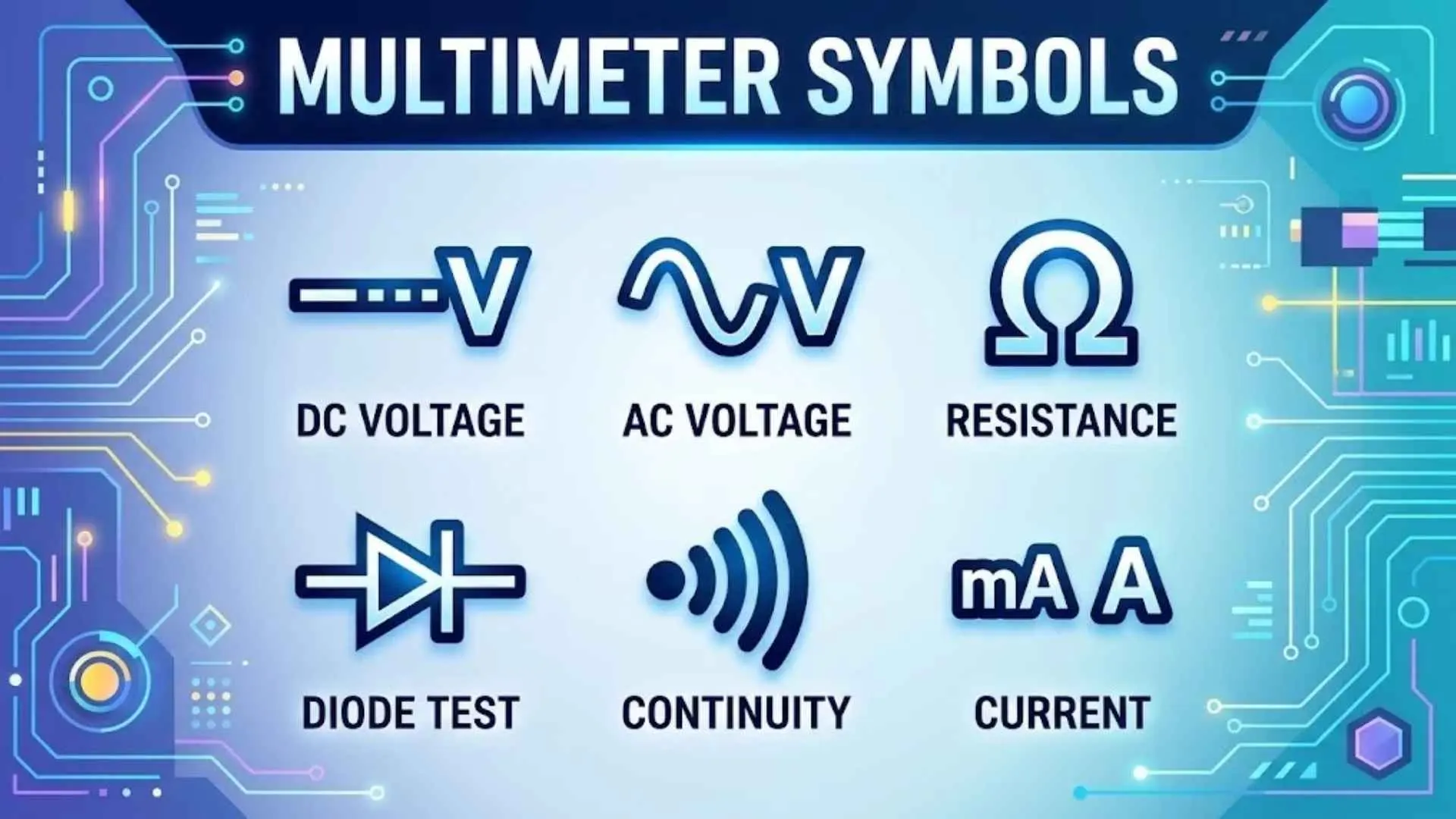
A digital multimeter can measure voltage, current, resistance, and several other electrical properties. However, before you can use one correctly, you need to understand the symbols on its dial, display, and input jacks.
This multimeter symbols guide explains common digital multimeter symbols, what each setting does, and how to interpret readings. It also covers advanced functions such as True RMS, Auto-V/LoZ, Min-Max recording, and non-contact voltage detection.
Whether you’re a beginner testing a battery or an electronics technician troubleshooting a circuit, this guide will help you identify multimeter symbols and meanings and choose the right measurement function.
Important safety note: Multimeters can help you diagnose electrical problems, but incorrect settings or connections can cause electric shock, burns, or equipment damage. Always follow your meter’s manual and use equipment rated for the circuit you’re testing.
What Are Multimeter Symbols?
Multimeter symbols are markings that identify measurement functions, electrical units, operating modes, and safety warnings. They help you select the correct setting and understand the value shown on the display.
A digital multimeter (DMM) combines the functions of a voltmeter, ammeter, and ohmmeter in one instrument. Depending on its features, it may also measure capacitance, frequency, temperature, and diode forward voltage.
You will usually find multimeter symbols in three places:
- Rotary dial: Identifies the measurement function you can select.
- Display: Shows the measured value, unit, range, and active modes.
- Input jacks: Identify where to connect the test leads for different measurements.
Some meters also have buttons that activate secondary functions. These may include continuity testing, temperature measurement, relative mode, or display hold.
The symbols are not identical across every manufacturer. For example, one meter may use a sound-wave icon for continuity, while another combines the continuity icon with the resistance symbol. Always check your specific model’s manual when a marking is unclear.
Multimeter Symbols Chart: Common Symbols and Their Meanings
Use this multimeter symbol chart to identify the most common settings at a glance.
| Symbol or marking | Meaning | Common application |
| V~ | AC voltage | Measuring alternating voltage |
| V⎓ | DC voltage | Testing batteries and DC power supplies |
| mV | Millivolts | Measuring small voltage signals |
| A~ | AC current | Measuring alternating current |
| A⎓ | DC current | Measuring direct current |
| mA | Milliamps | Measuring small currents |
| μA | Microamps | Measuring very small currents |
| Ω | Ohms | Measuring electrical resistance |
| kΩ | Kilohms | Measuring thousands of ohms |
| MΩ | Megohms | Measuring millions of ohms |
| Continuity icon | Continuity test | Checking wires and connections |
| Diode icon | Diode test | Checking a diode’s forward voltage |
| Capacitance icon or F | Capacitance | Measuring a capacitor’s value |
| Hz | Frequency | Measuring signal frequency |
| % | Duty cycle on supported meters | Measuring a PWM signal’s duty cycle |
| °C | Degrees Celsius | Temperature measurement |
| °F | Degrees Fahrenheit | Temperature measurement |
| HOLD | Display hold | Freezing the displayed reading |
| AutoHOLD | Automatic display hold | Capturing a stable measurement |
| MIN/MAX | Minimum and maximum | Recording measurement extremes |
| AVG | Average | Viewing an average reading when supported |
| REL or Δ | Relative measurement | Comparing against a reference value |
| HiRes | High-resolution mode | Displaying more measurement digits |
| hFE | Transistor current gain | Basic testing of supported transistors |
| NCV | Non-contact voltage detection | Detecting possible AC voltage without probe contact |
| LoZ | Low-impedance mode | Investigating possible ghost voltage |
| dB | Decibel measurement | Measuring a relative signal level on supported meters |
| COM | Common input | Usually connects to the black test lead |
| CAT II, CAT III, CAT IV | Measurement safety categories | Identifying suitable measurement environments |
| IP54 | Ingress protection rating | Indicating specified dust and water protection |
These markings are common examples, not a universal list. Some functions require a separate button, and some meters do not include them at all.
Multimeter Dial Symbols and Settings
The rotary dial selects the primary measurement function. Understanding its markings helps you avoid incorrect readings and prevent damage to the meter.
AC Voltage Symbol (V~)
The AC voltage symbol (V~) identifies alternating current voltage measurement. The tilde represents a waveform that changes direction periodically.
AC voltage is used in household electrical systems, transformers, and many industrial power circuits.
Common applications include:
- Checking an AC adapter or transformer output.
- Measuring voltage in compatible AC equipment.
- Testing a suitable AC supply with a properly rated meter.
- Measuring AC signals from supported electrical equipment.
For example, a meter displaying 120 V~ is reporting approximately 120 volts of AC voltage. The expected value depends on the electrical system and the measurement conditions.
Safety: Measuring mains voltage presents a serious shock hazard. If you are not trained to perform live electrical measurements, leave this work to a qualified electrician. Never exceed the meter’s voltage or measurement-category ratings.
DC Voltage Symbol (V⎓)
The DC voltage symbol (V⎓) identifies direct current voltage measurement. Its icon commonly resembles a solid line above a dashed line.
DC voltage has a fixed polarity in a typical steady-state circuit. Batteries, USB power supplies, and many electronic circuits use DC voltage.
Common applications include:
- Battery voltage testing
- Checking regulated power supply outputs
- Measuring logic supply rails in electronic circuits
- Testing low-voltage DC equipment
- Checking transformer outputs after rectification
Suppose you test a nominal 1.5-volt battery and the meter displays 1.42 V. The meter is reporting the battery’s present voltage under the measurement conditions. Whether the battery remains suitable for use depends on its chemistry, load, and the device’s requirements.
If the meter displays a negative sign, the probes may be connected with reversed polarity. On many digital meters, this does not damage the meter during an ordinary, correctly configured DC voltage measurement.
Millivolt Symbol (mV)
The millivolt symbol (mV) represents one-thousandth of a volt.
- 1 V = 1,000 mV
- 250 mV = 0.25 V
- 5 mV = 0.005 V
Millivolt measurement is useful when testing low-level sensor signals, small voltage drops, and some electronic circuits.
A meter’s resolution determines the smallest displayed change it can show. Resolution does not automatically mean accuracy. A meter may display several decimal places while still having a stated measurement uncertainty.
AC and DC Current Symbols (A~, A⎓, mA, and μA)
The current symbols identify settings for measuring electrical current.
| Symbol | Meaning | Typical use |
| A~ | AC current | Measuring supported alternating currents |
| A⎓ | DC current | Measuring direct currents |
| mA | Milliamps | Measuring smaller currents |
| μA | Microamps | Measuring very small currents |
Current is measured in amperes. One milliamp equals 0.001 ampere, while one microamp equals 0.000001 ampere.
These settings can help measure current in power supplies, relay coils, and low-power electronic circuits. Some meters also support current measurements for appliances and motors, but the correct method depends on the equipment and the meter’s rating.
Current measurement requires particular care. A multimeter normally measures current by becoming part of the circuit, so it must be connected in series. Connecting a meter in current mode directly across a battery or voltage source can create a short circuit.
Before measuring current, verify the selected input jack, current range, fuse rating, and manufacturer’s instructions.
Resistance Symbol (Ω)
The resistance symbol (Ω) represents ohms, the unit used to measure resistance.
Resistance describes how strongly a component opposes electrical current. It is an important measurement when checking resistors, switches, wires, and some electrical connections.
Common resistance units include:
- Ω: Ohms
- kΩ: Kilohms, or 1,000 ohms
- MΩ: Megohms, or 1,000,000 ohms
For example, a resistor marked 4.7 kΩ should measure close to 4,700 ohms when the measurement conditions and component tolerance are taken into account.
Before measuring resistance, disconnect power and isolate the component when necessary. Charged capacitors and parallel circuit paths can affect the reading.
Continuity Test Symbol
The continuity test symbol often resembles sound waves, a small speaker, or a buzzer. It may appear alongside the Ω symbol.
Continuity mode checks whether an electrical path has sufficiently low resistance for the meter’s test conditions. Many meters beep when the measured resistance falls below a model-specific threshold.
Continuity testing is useful for:
- Checking a wire or cable.
- Testing a disconnected fuse.
- Checking whether a switch closes.
- Finding broken circuit traces.
- Investigating poor connections.
- Detecting unintended connections between circuit points.
A beep does not prove that a connection can safely carry its rated current. It only indicates that the path meets the meter’s continuity criteria.
Likewise, no beep does not always mean a wire is completely broken. Resistance may exceed the meter’s beep threshold, or the probes may not make good contact.
Always disconnect power before checking continuity.
Diode Test Symbol
The diode test symbol usually resembles a diode circuit symbol. It identifies a function that applies a small test current and displays the diode’s forward voltage drop.
A diode allows current to flow more readily in one direction than the other under normal operating conditions.
To test a typical diode:
- Disconnect power from the circuit.
- Isolate the diode if other components could affect the result.
- Select diode mode.
- Connect the probes in one direction and record the reading.
- Reverse the probes and compare the result.
A healthy silicon diode often shows a forward voltage drop in the general range of about 0.5–0.8 V, although the actual value depends on the device and test current. Schottky diodes and LEDs can show different values.
A reading of OL in one direction may indicate that the diode is blocking the meter’s test current. If both directions show a very low drop, the diode may be shorted. These are basic clues rather than a complete diagnosis.
Capacitance Symbol
The capacitance symbol often resembles two parallel plates. Some meters display the letter F, which stands for farads.
Capacitance describes a component’s ability to store electrical charge. Common units include:
- Microfarads (μF)
- Nanofarads (nF)
- Picofarads (pF)
Capacitance measurement can help check capacitors used in power supplies, motor circuits, and electronic devices.
However, a capacitance reading alone cannot confirm that a capacitor is healthy. A capacitor may measure within its rated capacitance but still have excessive leakage or equivalent series resistance.
Disconnect and safely discharge capacitors before testing. Some capacitors can retain dangerous energy after equipment has been switched off. Use an appropriate discharge procedure and verify the condition before handling the component.
Frequency Symbol (Hz)
The frequency symbol (Hz) identifies frequency measurement. Hertz indicates the number of cycles per second.
For example, a 50 Hz signal completes 50 cycles per second. A 60 Hz signal completes 60 cycles per second.
Frequency mode may be useful when testing:
- Oscillator outputs
- Clock generators
- PWM controllers
- Supported motor-drive signals
- Electronic control circuits
The meter must support the frequency range and signal level being measured. A frequency reading can be unreliable when the waveform is too small, distorted, noisy, or outside the instrument’s specified limits.
Duty Cycle Symbol (%)
On a compatible multimeter, the percentage symbol can indicate duty cycle measurement.
Duty cycle describes the percentage of one signal period during which a signal remains in its active state. It is often used with pulse-width modulation (PWM), which controls power or signal behavior by switching rapidly.
For example, a 25% duty cycle means the signal remains active for one-quarter of each period, according to the meter’s interpretation of the signal.
Duty cycle measurement can help troubleshoot electronic control signals. The meter must support the function, and the signal must fall within its specified frequency and voltage limits.
Temperature Symbols (°C and °F)
The temperature symbols identify measurements in Celsius and Fahrenheit.
Some multimeters support temperature measurement through a compatible probe, often a Type-K thermocouple.
Temperature measurement can help monitor equipment, check component heating, or investigate thermal problems in electronics.
Before using this function, confirm that the probe type, temperature range, and input connections match the meter’s instructions. A temperature symbol does not mean every meter includes a temperature sensor.
Multimeter Display Symbols and Reading Indicators
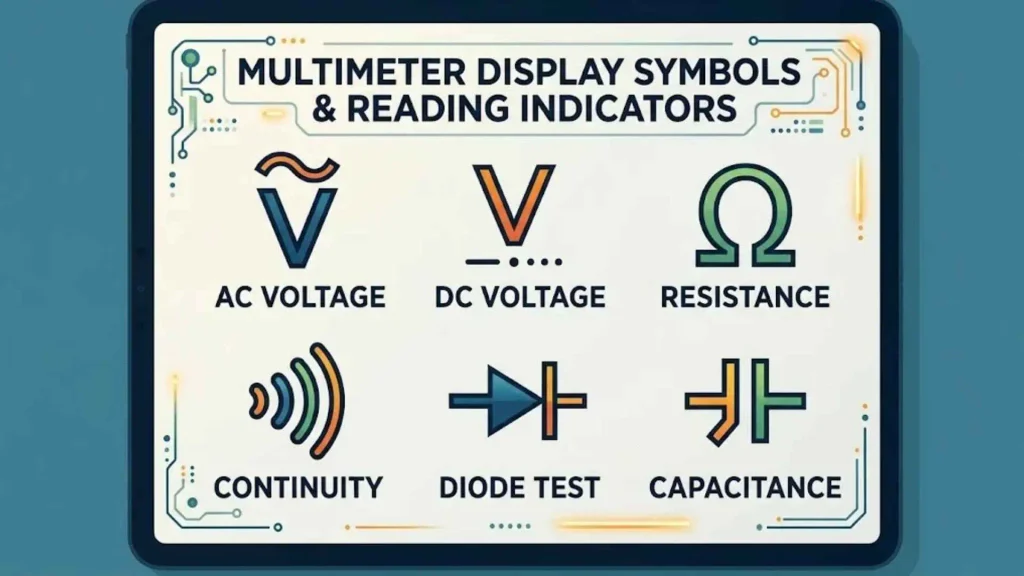
The display shows the measured value and may also include indicators for range, polarity, and active functions. Learning these multimeter display symbols helps you interpret readings correctly.
OL: Overload or Out-of-Range Reading
OL commonly means the reading is outside the selected range or that the meter cannot display a valid value for the chosen function. In resistance or continuity mode, it can also indicate an open circuit.
For example, a resistance reading may display OL if the resistance exceeds the meter’s supported range.
When you see OL:
- Check that you selected the correct function.
- Confirm that the leads are connected to the correct jacks.
- Check whether the measured value exceeds the range.
- In resistance or continuity mode, investigate possible open connections.
- Consult the manual for the model-specific meaning.
Do not assume OL always means the meter is broken.
HOLD and AutoHOLD
HOLD freezes the current displayed reading so you can record it without continuously watching the screen.
AutoHOLD, when available, attempts to capture a stable reading automatically. The exact behavior varies by meter.
These features can be useful when readings are difficult to see, but a held value is not necessarily the circuit’s current value. Confirm that the display is updating before relying on a measurement.
MIN, MAX, and AVG Symbols
The Min-Max function records measurement extremes over a period of time.
- MIN: Lowest recorded value.
- MAX: Highest recorded value.
- AVG: Average value, when the meter supports it.
These functions can help investigate fluctuating voltage, intermittent faults, and changing current.
However, recording speed matters. A meter may miss a very short transient if the event is faster than its capture capability. Some meters offer a separate peak mode for specific fast events.
REL and REL Δ Symbols
The REL symbol on a multimeter indicates relative measurement mode. It stores a reference reading and shows the difference between that reference and a later measurement.
For example, if a meter stores a reference of 10.0 Ω and the next measurement is 10.4 Ω, relative mode may display a difference of 0.4 Ω.
REL mode is useful for comparing small changes or compensating for certain lead and fixture effects. It can also hide the absolute reading, so exit relative mode when you need the actual measured value.
Δ%: Percentage Deviation
The Δ% symbol indicates a percentage difference or deviation function on some meters. The exact calculation depends on the model.
It can help compare a measurement with a stored reference or expected value. Read the manual to determine how the meter defines its reference and calculates the percentage.
HiRes and Analog Bar Graph
HiRes usually refers to high-resolution mode. It may display more digits than the standard display mode.
More displayed digits do not automatically mean better accuracy. Measurement accuracy depends on the meter’s specifications, calibration, range, and test conditions.
An analog bar graph shows changes in a visual format. It can be useful when a reading fluctuates, even when the numeric display updates too slowly to show every change clearly.
Low-Battery and Polarity Indicators
A low-battery icon warns that the meter’s battery may need replacement. Low battery conditions can affect operation on some models, so follow the manual’s instructions.
A negative sign before a DC reading usually indicates that the probes are connected opposite to the expected polarity.
Other display indicators may identify the selected unit, automatic range selection, recording mode, or a hazardous-voltage warning.
Advanced Digital Multimeter Symbols and Functions
Professional multimeters often include functions designed for specialized electrical measurements and troubleshooting.
Auto-Ranging and Manual Range Selection
An auto-ranging multimeter automatically selects a suitable measurement range. This is convenient when you do not know the approximate value.
Manual range selection allows you to choose the range yourself. It can be useful when making repeated measurements of similar values or when a specific range is needed.
| Feature | Auto-ranging | Manual ranging |
| Range selection | Meter selects a range | User selects a range |
| Ease of use | Usually easier for beginners | Requires more knowledge |
| Repeated measurements | May change ranges automatically | Can keep a fixed range |
| Potential limitation | Range changes may take time | Incorrect range selection can cause over-range readings |
Always follow the meter’s instructions. Range selection does not override the instrument’s maximum voltage or current rating.
True RMS Multimeter
A True RMS multimeter measures the root-mean-square value of an AC signal within the meter’s specified limits.
True RMS measurement can provide a more accurate result than average-responding meters when measuring certain distorted or nonsinusoidal waveforms.
However, True RMS does not mean the meter can measure every waveform accurately. Frequency bandwidth, crest factor, input range, and other specifications still matter.
This function is particularly relevant when testing some variable-frequency drives, electronic power supplies, and equipment that produces non-sinusoidal signals.
Auto-V and LoZ Symbols
Auto-V is a model-specific function that may automatically detect whether a voltage measurement should use AC or DC settings. Some meters combine automatic voltage detection with low input impedance.
LoZ stands for low impedance. It identifies a voltage measurement mode with lower input impedance than a typical high-impedance voltage input.
LoZ can help investigate ghost voltage, also called phantom voltage. This can occur when stray capacitive coupling induces a voltage on an otherwise disconnected conductor.
A low-impedance measurement can reduce some false or misleading voltage readings. However, it also loads the circuit more heavily and may affect sensitive electronics.
Use LoZ only when the meter’s manual confirms that it is suitable for the circuit. Never treat a single reading as sufficient proof that a circuit is safe to touch.
Low-Pass Filter Symbol (K on Some Fluke Models)
Some meters include a low-pass filter function for measurements involving variable-frequency drives or other equipment with high-frequency components.
A low-pass filter reduces the effect of signals above a specified frequency range, helping the meter focus on a lower-frequency component in suitable applications.
The K symbol on a Fluke multimeter is model-specific and may be associated with a particular low-pass filter function. It is not a universal symbol for every multimeter.
When measuring inverter or motor-drive waveforms, check the meter’s bandwidth, filter behavior, and operating instructions. Filtering can improve some measurements, but it may also hide signal components relevant to the diagnosis.
Transistor Gain Symbol (hFE)
The hFE symbol identifies a basic transistor current-gain test on meters that support it.
For a bipolar junction transistor, hFE refers to the ratio between collector current and base current under specified conditions.
Some meters include dedicated transistor sockets. Others do not support hFE measurement at all.
The reading can help with a basic transistor check, but it is not a complete performance test. Results depend on the test current, temperature, and transistor characteristics.
Non-Contact Voltage Symbol (NCV)
NCV means non-contact voltage. This feature detects an electric field associated with AC voltage without requiring a conductive probe connection.
It can be useful for preliminary checks around compatible wiring or equipment. However, detection depends on factors such as voltage level, distance, shielding, and the sensor design.
NCV can fail to detect a live conductor under some conditions. It may also respond to a nearby energized source that is not the conductor you intend to test.
Never use NCV alone to verify that a circuit is de-energized. Follow an approved voltage-verification procedure with an appropriately rated instrument.
Decibel Symbol (dB)
The dB symbol identifies decibel measurement on meters that include this function.
Decibels express a logarithmic ratio. On a multimeter, the meaning of a dB reading depends on the instrument’s reference conditions and measurement method.
Check the manual before interpreting the result, especially when comparing readings between different meters or electrical systems.
Backlight, Bluetooth, and Data Logging
These features are usually marked by dedicated buttons or menu icons rather than universal measurement symbols.
- Backlight: Makes the display easier to read in dim conditions.
- Bluetooth: Sends readings to a compatible phone or computer on supported models.
- Data logging: Records measurements over time.
- Built-in oscilloscope functionality: Available only on specialized instruments that explicitly support it.
Do not assume a multimeter includes these features simply because another model from the same manufacturer does.
Multimeter Input Jack Symbols and Test Lead Connections
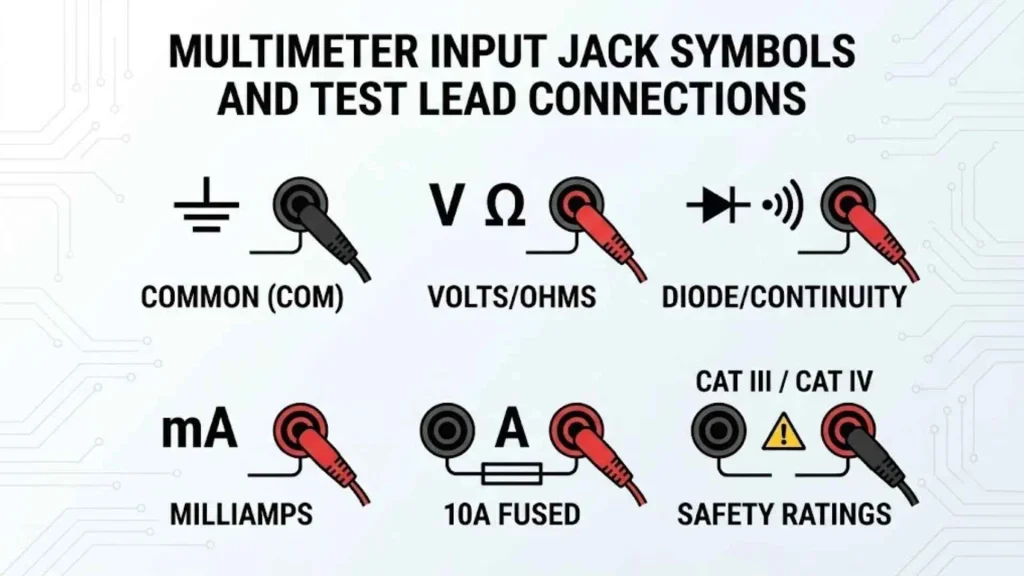
The input jacks determine where you connect the test leads. Incorrect connections can damage the meter or create a serious hazard.
COM Jack
COM means common. On most handheld digital multimeters, the black test lead connects to this jack for ordinary measurements.
The COM terminal acts as the common reference or return connection for the selected measurement.
V, Ω, and Continuity Input
A jack marked V, Ω, or a combination of symbols usually accepts the red lead for voltage, resistance, continuity, diode, and sometimes capacitance measurements.
The exact functions depend on the model. Read the labels printed beside the jacks rather than assuming every meter uses the same arrangement.
mA or μA Input Jack
The mA or μA jack is designed for current measurements within its stated limits. It may be protected by a fuse.
Before using it, check the maximum current, fuse specification, and permitted measurement duration. A low-current input is not suitable for every current measurement.
10 A or High-Current Input Jack
A jack marked A or 10 A is intended for current measurements within its rated limits. Some meters allow higher current only for a limited time.
Never assume that a 10 A marking means the meter can measure 10 A continuously. The manual may specify time limits, cooldown periods, or other conditions.
Correct Test Lead Placement
Before connecting a meter, confirm all three items:
- The selected dial function matches the measurement.
- The black lead is connected to COM.
- The red lead is connected to the correct input jack.
A common mistake is leaving the red lead in a current jack and then trying to measure voltage. Depending on the circuit and meter design, this can cause a short circuit and serious damage.
Multimeter Safety Symbols, CAT Ratings, and IP Codes
Multimeter safety markings help users determine whether an instrument is suitable for a particular electrical environment.
A meter’s safety category is not just a quality label. It relates to the electrical environment and transient energy the instrument is designed to withstand when used within its ratings.
CAT II Rating
CAT II generally applies to measurements on circuits connected to the low-voltage installation, such as certain plug-connected equipment and loads.
The permitted use still depends on the meter’s complete rating and the manufacturer’s instructions.
CAT III Rating
CAT III generally covers measurements in fixed electrical installations, such as distribution equipment, feeders, and certain building wiring.
These environments may expose instruments to significant transient voltages. Use only equipment rated for the specific circuit.
CAT IV Rating
CAT IV generally applies to measurements at the origin of a low-voltage installation, such as a service entrance or the supply side of a meter.
These locations can expose equipment to high transient energy. CAT IV-rated equipment must still meet the relevant voltage rating and operating requirements.
CAT II vs. CAT III vs. CAT IV
| Category | General measurement environment | Example |
| CAT II | Loads and plug-connected equipment | Certain appliance measurements |
| CAT III | Fixed installations and distribution circuits | Suitable distribution equipment |
| CAT IV | Origin of the installation | Service entrance or utility supply side |
This table is a general guide, not permission to perform a particular measurement. A CAT rating must be considered together with the voltage rating, test leads, accessories, and the manufacturer’s instructions.
What Does IP54 Mean on a Multimeter?
IP54 is an Ingress Protection code that describes specified protection against solid particles and water.
- 5: Dust-protected, meaning dust ingress is not completely prevented but must not interfere with satisfactory operation under the specified test.
- 4: Protected against water splashes from any direction under the specified test conditions.
IP54 does not mean waterproof. It also does not establish that the meter is suitable for every outdoor, wet, or hazardous electrical environment.
Essential Multimeter Safety Precautions
Follow these practices whenever you use a multimeter:
- Inspect the meter, probes, and lead insulation before use.
- Never exceed the meter’s maximum voltage, current, or CAT ratings.
- Use the correct input jack for the selected function.
- Disconnect power before resistance, continuity, or diode testing.
- Safely discharge capacitors before testing them.
- Use suitable protective equipment and approved procedures for hazardous work.
- Never use a damaged meter or test lead.
- Do not rely on NCV alone to establish that a circuit is de-energized.
- If you are not trained to measure live mains voltage, contact a qualified electrician.
For additional detail, consult the IEC standard for handheld multimeters and the safety section of your instrument’s manual.
How to Read Multimeter Symbols: Practical Examples
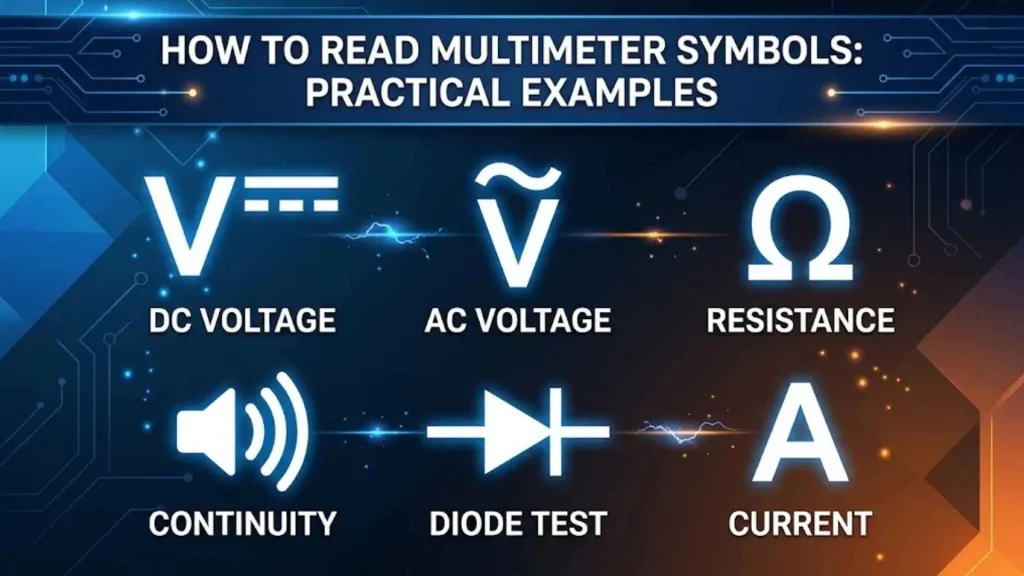
Understanding symbols is easier when you connect each one to a real measurement.
How to Measure a Battery’s DC Voltage
For an ordinary low-voltage battery measurement:
- Connect the black lead to COM.
- Connect the red lead to the voltage input.
- Select DC voltage, marked V⎓.
- Place the probes on the battery’s positive and negative terminals.
- Read the displayed voltage and compare it with the battery manufacturer’s guidance.
A negative sign usually means the probes are reversed relative to the expected polarity.
Do not use this procedure for batteries or electrical systems that exceed the meter’s ratings.
How to Measure AC Voltage
AC voltage measurement uses the V~ setting on many meters.
Before making any measurement, confirm that the meter and probes are rated for the circuit and that you understand the required safe procedure. Mains voltage can cause fatal injury.
If you lack the training or equipment needed for live electrical work, have a qualified electrician perform the measurement.
How to Measure Resistance
To measure resistance safely:
- Disconnect power from the circuit.
- Confirm that stored energy has been addressed.
- Select Ω mode.
- Place the probes across the component or section being tested.
- Compare the result with the expected value.
If other components remain connected in parallel, the reading may differ from the component’s rated resistance. Isolating one side of the component may be necessary.
How to Check Continuity With a Multimeter
Continuity testing helps determine whether a low-resistance path exists.
- Disconnect power and verify the circuit is safe to test.
- Select the continuity symbol.
- Place the probes at the two points you want to check.
- Listen for the beep, if available, and observe the reading.
A beep indicates that the measured path meets the meter’s continuity threshold. It does not prove that the connection is suitable for carrying its intended current.
How to Test a Diode Using a Digital Multimeter
Use diode mode to check a diode’s forward voltage.
- Disconnect power and isolate the diode if necessary.
- Select the diode test symbol.
- Connect the probes in one direction and record the reading.
- Reverse the probes and compare the result.
A typical silicon diode often shows a forward voltage drop around 0.5–0.8 V, but different components can behave differently. Consult the component’s datasheet when the exact expected value matters.
How to Measure Capacitance With a Multimeter
Before measuring a capacitor, disconnect the equipment from its power source and safely discharge the capacitor using an appropriate procedure.
Then:
- Confirm the capacitor is safe to handle.
- Isolate it from the circuit when necessary.
- Select the capacitance function.
- Connect the probes as instructed by the meter’s manual.
- Compare the displayed value with the rated capacitance and tolerance.
Never short capacitor terminals with a tool as a substitute for a proper discharge procedure. Some capacitors can store dangerous energy even after power is removed.
Common Multimeter Symbol Mistakes and Troubleshooting
Incorrect settings can produce confusing readings or create safety risks. Use this troubleshooting guide to identify common problems.
| Problem | Possible reason | What to check |
| Unexpected voltage reading | Wrong AC/DC mode or poor contact | Confirm the setting and connection |
| OL in resistance mode | Open circuit or value beyond range | Check the circuit and selected range |
| No continuity beep | Open path or resistance above the threshold | Check probe contact and meter settings |
| Unexpected resistance value | Parallel circuit paths | Isolate the component if appropriate |
| Current reading stays at zero | Incorrect connection or wrong jack | Check the circuit and input terminals |
| Meter shows a negative DC value | Reversed probe polarity | Confirm the expected polarity |
| NCV does not detect voltage | Shielding, distance, or sensor limitations | Use an approved voltage-verification procedure |
| Display changes unexpectedly | Fluctuating signal or poor contact | Inspect connections and recording settings |
| Meter does not turn on | Low battery or other fault | Follow the manufacturer’s troubleshooting steps |
Selecting AC Instead of DC Voltage
AC and DC are different measurement functions. Selecting the wrong mode may result in an unexpected reading or an unsuitable measurement.
Confirm whether the source is AC or DC before selecting the setting. When the source is unknown, do not guess if the circuit may be hazardous.
Measuring Current in Parallel
A current input has a low resistance by design. Connecting it directly across a voltage source can create a short circuit.
Current is normally measured in series, using the correct current input and a suitable range. If you are unsure how to connect the meter safely, do not proceed.
Misreading OL
OL can indicate an over-range condition, an open circuit, or another model-specific state. The meaning depends on the selected function.
Check the manual rather than assuming that every OL reading means the same thing.
Confusing NCV Detection With a Verified Voltage Test
NCV is useful for preliminary detection, but it can miss energized conductors. It can also detect fields from nearby sources.
Use a properly rated instrument and an approved verification procedure when determining whether electrical equipment is de-energized.
Frequently Asked Questions About Multimeter Symbols
What Do the Symbols on a Digital Multimeter Mean?
Digital multimeter symbols identify measurement functions, units, display modes, input connections, and safety ratings. Common examples include V~ for AC voltage, V⎓ for DC voltage, Ω for resistance, and the continuity icon for checking electrical paths.
What Does V~ Mean on a Multimeter?
V~ usually means AC voltage measurement. The tilde represents alternating voltage. Confirm the meter’s voltage rating and use the correct measurement procedure before testing an electrical circuit.
What Is the Symbol for DC Voltage on a Multimeter?
The common DC voltage symbol is V⎓. The symbol resembles a solid line above a dashed line. It is used for measurements such as battery voltage and DC power supply outputs.
What Does the Ω Symbol Mean on a Multimeter?
Ω is the Greek letter omega and represents ohms, the unit of electrical resistance. A multimeter’s Ω setting measures resistance when used under the conditions specified by the manufacturer.
What Do mA and μA Mean on a Multimeter?
mA means milliamps, and μA means microamps. One milliamp equals 0.001 ampere, while one microamp equals 0.000001 ampere. These ranges are used for smaller current measurements when supported by the meter.
What Is the Continuity Symbol on a Digital Multimeter?
The continuity symbol often looks like sound waves or a small buzzer. It identifies a function that checks for a sufficiently low-resistance electrical path. The icon and beep threshold vary by model.
What Does the Diode Symbol Mean on a Multimeter?
The diode symbol selects a test that measures a diode’s forward voltage drop. Comparing readings with the probes in both directions can help identify some common diode faults.
How Do You Measure Capacitance With a Multimeter?
Use a meter that supports capacitance measurement. Disconnect power, safely discharge the capacitor, and isolate it from the circuit when needed. Then select capacitance mode and compare the result with the component’s rated value and tolerance.
What Does Hz Mean on a Multimeter?
Hz stands for hertz, the unit of frequency. One hertz equals one cycle per second. A multimeter with a frequency function can measure supported signals within its specified range.
What Does Auto-V/LoZ Mean on a Multimeter?
Auto-V may automatically select a voltage measurement mode on compatible meters. LoZ means low impedance and can help investigate ghost voltage. These features are model-specific and must be used according to the manual.
What Is the K Symbol on a Fluke Multimeter?
On certain Fluke models, K may identify a specific low-pass filter function. It is not a universal multimeter symbol. Check the manual for your exact model to confirm its meaning and use.
What Does the REL Symbol Mean on a Multimeter?
REL indicates relative measurement mode. The meter stores a reference reading and displays the difference between that value and a later reading. This can help compare small changes, but it may hide the absolute measurement.
What Does AutoHOLD Do on a Digital Multimeter?
AutoHOLD attempts to capture a stable measurement and retain it on the display. The exact behavior varies by model. Check whether the displayed value is held or live before recording a result.
What Does hFE Mean on a Multimeter?
hFE represents the DC current gain of a bipolar junction transistor. A meter with an hFE function can perform a basic gain test on supported transistors, but it does not replace a full component test.
What Does NCV Mean on a Multimeter?
NCV stands for non-contact voltage. It detects an electric field associated with AC voltage without direct conductive contact. Because detection can fail under some conditions, NCV should not be used alone to verify that a circuit is safe.
What Is the Difference Between CAT II, CAT III, and CAT IV?
These measurement categories describe different electrical environments and transient risks. CAT II generally covers certain loads, CAT III covers fixed installation and distribution circuits, and CAT IV covers the origin of an installation. Always check the complete rating, not just the category number.
What Does IP54 Mean on a Multimeter?
IP54 indicates specified dust protection and protection against water splashes under defined test conditions. It does not mean the meter is waterproof or suitable for every wet environment.
How Do You Safely Measure Current With a Multimeter?
Use a meter rated for the circuit, select the correct current function, and connect the leads to the appropriate current input. Current is normally measured in series. Never connect a current input directly across a voltage source.
How Do You Identify Ghost Voltage Using LoZ Mode?
A suitable LoZ function can reduce some ghost-voltage readings caused by capacitive coupling. Only use it when the meter and circuit are compatible. Follow the approved procedure for voltage verification rather than relying on one reading.
Conclusion: Understanding Multimeter Symbols and Meanings
Understanding multimeter symbols and meanings makes electrical testing easier and helps you avoid common measurement errors.
Start by learning the essential symbols: V~ for AC voltage, V⎓ for DC voltage, A for current, Ω for resistance, and the continuity and diode icons for component testing. Then learn the display indicators, input jacks, and safety ratings on your specific meter.
Advanced functions such as True RMS, Auto-V/LoZ, Min-Max recording, REL, and NCV can make troubleshooting more effective, but their limits matter.
Most importantly, choose the correct setting, connect the test leads properly, and follow the manufacturer’s safety instructions. When a measurement involves hazardous voltage or you are unsure how to proceed, ask a qualified electrical professional.

Hi, I’m Sienna Brooks, and I believe that the right words can inspire, comfort, and empower people at every stage of life. For as long as I can remember, I’ve been drawn to meaningful quotes and the stories behind them. I love curating collections of inspirational, motivational, and heartfelt quotes that resonate with readers around the world.
Through my writing, I strive to help others find encouragement, whether they’re celebrating life’s happiest moments or navigating its biggest challenges. I believe that wisdom is timeless, and I’m passionate about sharing words that leave a lasting impact.
I am the author of Reflections in Words and The Journey of Inspiration, two books dedicated to exploring the beauty and power of timeless quotes.
 Asher Monroe
 Rowan Sinclair Rowan Sinclair