Understanding the symbols on your OMRON blood pressure monitor makes home blood pressure monitoring easier and safer. A small icon can tell you whether the cuff fits correctly, whether your reading is unusually high, or whether your device needs new batteries. Other indicators help you transfer readings to your smartphone or review previously stored measurements.
This OMRON symbols glossary focuses on the OMRON HEM-7183T1-FL and HEM-7183T1-FLB automatic blood pressure monitors. These models include indicators for cuff placement, heartbeat detection, hypertension, movement errors, Bluetooth connectivity, battery status, and stored readings. Their instruction manual explains what each symbol means and how to respond.
Although many OMRON monitors share similar features, their displays aren’t identical. Always check your exact model’s instruction manual before interpreting an unfamiliar icon or error message.
OMRON Blood Pressure Monitor Symbols and Meanings at a Glance
The following table summarizes the main display symbols on the HEM-7183T1-FL and HEM-7183T1-FLB. Because some symbols are graphical, their appearance may be easier to recognize in the illustrations in your manual.
| Symbol or indicator | Meaning | What you should do |
| OK cuff wrap guide | The cuff is wrapped correctly during measurement | Continue measuring and remain still |
| Loose cuff wrap guide | The cuff isn’t wrapped correctly | Reapply the cuff according to the instructions |
| Bluetooth ON | Bluetooth is enabled or readings are being transferred | Check the connection if transfer doesn’t complete |
| Bluetooth OFF | Bluetooth is disabled | Enable it if you want to transfer readings |
| Systolic reading | Pressure when the heart contracts | Record the upper number |
| Diastolic reading | Pressure between heartbeats | Record the lower number |
| Heartbeat symbol | The monitor detects heartbeats during measurement | Remain still until the measurement finishes |
| Deflation symbol | The cuff is releasing air | Wait for the result |
| Trend indicator | The systolic and/or diastolic reading is higher than previous readings | Review your readings over time |
| Sync symbol | Stored memory is almost full | Transfer stored readings before older data is overwritten |
| Memory symbol | The monitor is displaying stored readings | Review the measurement history |
| Low battery symbol | The batteries are running low | Prepare replacement batteries |
| Depleted battery symbol | The batteries need replacement | Replace all four AA batteries as directed |
| Hypertension symbol | The reading meets the monitor’s high-reading threshold | Record the reading and follow appropriate medical guidance |
| Irregular heartbeat symbol | The monitor detected an irregular rhythm during measurement | Repeat carefully and seek medical advice if it recurs |
| Movement error symbol | Movement may have affected the reading | Rest briefly and repeat the measurement |
These meanings are specific to the documented HEM-7183T1-FL/FLB display. Other OMRON models may use different icons or functions.
Understanding OMRON Blood Pressure Reading Symbols
Before interpreting warning indicators, learn how the monitor displays your actual blood pressure. The two main numbers represent systolic and diastolic pressure. The device may also display your pulse rate and other measurement information.
Systolic Blood Pressure Symbol
Systolic blood pressure is the upper number in a blood pressure reading. It measures the pressure in your arteries when your heart contracts and pumps blood.
For example, if your monitor displays 122/78 mmHg, the systolic reading is 122 mmHg.
Systolic pressure can change throughout the day. Physical activity, stress, caffeine, pain, and measurement technique may all influence your results. That’s why a single reading doesn’t always represent your usual blood pressure.
Diastolic Blood Pressure Symbol
Diastolic blood pressure is the lower number. It measures arterial pressure while your heart relaxes between beats.
In a reading of 122/78 mmHg, the diastolic value is 78 mmHg. Both numbers matter when assessing blood pressure.
A reading can be elevated because of the systolic value, the diastolic value, or both. Don’t ignore one number simply because the other appears normal.
Pulse Rate Symbol
The pulse rate display shows how many times your heart beats per minute. The unit is commonly written as BPM.
Blood pressure and pulse rate measure different things. Blood pressure describes the force of blood against artery walls, while pulse rate describes the frequency of your heartbeat.
For example, a reading might show a blood pressure of 118/76 mmHg and a pulse rate of 72 BPM. The pulse value isn’t another blood pressure number.
If your pulse readings repeatedly concern you, discuss them with a healthcare professional. Symptoms such as chest pain, fainting, or severe shortness of breath require urgent medical attention.
OMRON Hypertension Symbol: What Does the High Blood Pressure Indicator Mean?
The hypertension symbol on the HEM-7183T1-FL and HEM-7183T1-FLB indicates that a measurement has reached the monitor’s specified high-reading threshold.
According to the instruction manual, this symbol appears when:
- Systolic blood pressure is 135 mmHg or higher.
- Diastolic blood pressure is 85 mmHg or higher.
- Either condition occurs, even if the other number remains below its threshold.
For example, a reading of 138/79 mmHg meets the systolic threshold. A reading of 128/86 mmHg meets the diastolic threshold.
These values are important to understand because the monitor uses a home blood pressure threshold. They aren’t a complete diagnosis of hypertension. Diagnosis depends on your overall readings, clinical circumstances, and healthcare professional’s assessment.
What should you do when the hypertension symbol appears?
- Sit quietly and make sure your posture and cuff placement are correct.
- Repeat the measurement after waiting two to three minutes, or follow your healthcare professional’s instructions.
- Record both numbers, along with the date and time.
- Discuss repeatedly elevated readings with your healthcare professional.
Don’t change your medication dose based on the monitor’s symbol alone.
If your blood pressure is above 180 systolic and/or 120 diastolic, wait at least one minute and measure again. If it remains that high, contact a healthcare professional immediately. If you also have chest pain, shortness of breath, weakness, numbness, vision changes, or difficulty speaking, call emergency services.
OMRON Heartbeat and Measurement Status Symbols
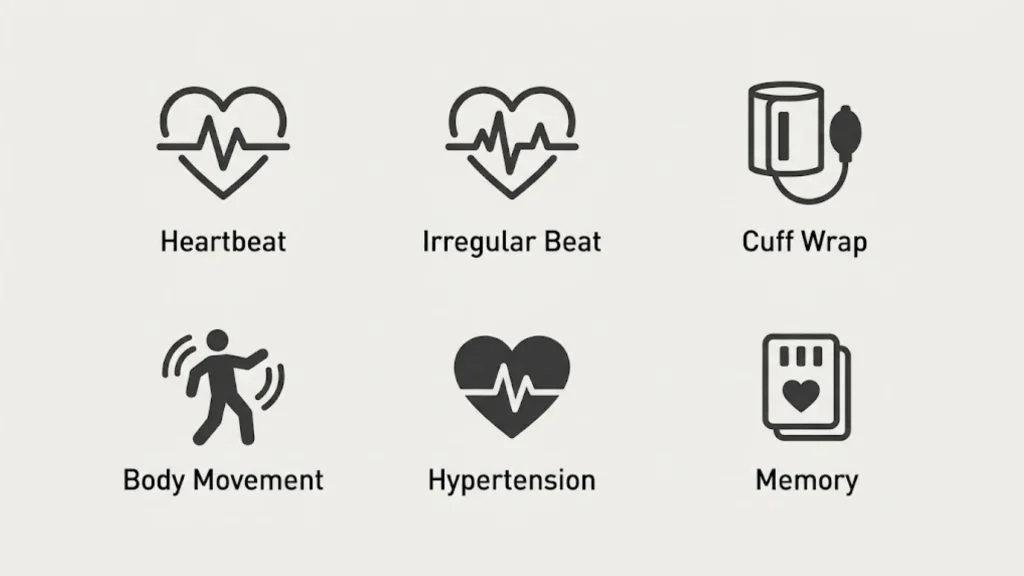
The monitor uses several indicators to show what’s happening during a measurement. Understanding them helps you distinguish normal operation from a potential measurement problem.
Heartbeat Symbol
The heartbeat symbol flashes while the monitor measures your blood pressure. It indicates that the device is detecting heartbeats during the measurement process.
The monitor uses the oscillometric method. As the cuff inflates and deflates, its pressure sensor detects changes associated with blood flow in your upper arm. The device processes these signals to estimate your blood pressure and pulse rate.
When the heartbeat symbol flashes, remain still and avoid talking. Movement or conversation can interfere with the measurement and produce an unreliable result.
The heartbeat symbol alone doesn’t mean you have an irregular heartbeat. It serves a different purpose from the irregular heartbeat indicator.
Irregular Heartbeat Symbol
The irregular heartbeat symbol appears when the HEM-7183T1-FL/FLB detects a rhythm variation meeting its detection criteria during measurement.
The manual defines an irregular rhythm for this monitor as a detected heartbeat interval that is 25% less or 25% more than the average detected rhythm. The indicator appears when irregular rhythm is detected at least twice during a measurement.
However, an irregular heartbeat indicator doesn’t identify the exact cause. It doesn’t independently diagnose atrial fibrillation, atrial premature beats, ventricular premature beats, or another heart rhythm disorder.
Arm movement can also cause this indicator to appear. If you see it:
- Sit quietly with your back supported.
- Support your arm at heart level.
- Make sure the cuff fits correctly.
- Repeat the measurement according to the instructions.
- Contact your healthcare professional if the symbol appears repeatedly.
Don’t dismiss recurring alerts, especially if you experience dizziness, palpitations, fainting, or unusual shortness of breath.
Deflation Symbol
The deflation symbol appears while the monitor releases air from the cuff.
Cuff deflation is a normal part of automatic blood pressure measurement. The device analyzes pressure changes during the process before displaying your result.
You don’t need to press additional buttons when this symbol appears. Keep your arm relaxed and wait for the measurement to finish.
If the cuff doesn’t deflate normally or you experience unusual pain, stop the measurement and follow the troubleshooting instructions in your manual.
Movement Error Symbol
The movement error symbol warns that body movement may have affected the reading.
Even small movements can interfere with the pressure signals detected by the monitor. Talking, trembling, shivering, or shifting your arm can also affect accuracy.
The manual recommends removing the cuff, waiting two to three minutes, reapplying it, and taking another measurement while remaining still.
For a more reliable result:
- Sit in a quiet room.
- Keep your feet flat on the floor.
- Support your back and arm.
- Avoid talking or moving.
- Don’t tighten your hand into a fist.
If the error keeps appearing despite correct technique, inspect the cuff and tubing for damage and consult the manual.
OMRON Cuff Placement Symbols and Their Meanings
Incorrect cuff placement is a common reason for unreliable blood pressure readings. The HEM-7183T1-FL/FLB includes a cuff wrap guide to help users identify whether the cuff has been applied correctly.
OK Cuff Wrap Guide Symbol
The OK cuff wrap guide symbol indicates that the cuff is wrapped correctly during measurement on the supported model.
This indicator helps you check cuff application, but it doesn’t guarantee that every aspect of your measurement technique is correct. You must still sit properly, support your arm, and remain still.
If the OK symbol appears, continue the measurement without changing your position.
Loose Cuff Wrap Guide Symbol
The loose cuff symbol indicates that the cuff hasn’t been applied correctly.
Possible causes include:
- Wrapping the cuff too loosely.
- Positioning it incorrectly on the upper arm.
- Failing to secure the cuff properly.
- Applying the cuff over thick clothing.
- Using a cuff that doesn’t fit the arm.
To correct the problem, stop the measurement and reapply the cuff.
For the HEM-FL31 cuff, the specified upper-arm circumference is 22–42 cm. Measure your arm and verify that the cuff supplied with your device is appropriate.
Correct Arm Cuff Positioning
Follow these steps when applying your cuff:
- Expose your upper arm so the cuff rests against bare skin.
- Insert the air plug into the monitor’s air jack.
- Position the cuff on your upper arm as directed in the manual.
- Keep the bottom edge approximately 1–2 cm above the inside of the elbow.
- Position the air tube along the inside of the arm.
- Secure the cuff snugly without making it painfully tight.
- Support your arm at heart level before starting the measurement.
Don’t place the cuff over thick clothing or roll a sleeve so tightly that it constricts your upper arm.
A correctly positioned cuff is essential, but it can’t eliminate all measurement variability. Consistent posture, adequate rest, and proper timing matter too.
OMRON Bluetooth Symbols and Connection Indicators
Bluetooth indicators help you understand whether your monitor can communicate with a compatible smart device. On the HEM-7183T1-FL/FLB, Bluetooth connectivity supports transferring blood pressure readings to the OMRON connect app.
Bluetooth ON Symbol
The Bluetooth ON symbol indicates that Bluetooth is enabled or involved in the reading-transfer process, depending on the display state.
The monitor uses Bluetooth Low Energy for wireless communication. To transfer readings, you need a compatible smartphone or other supported smart device and the appropriate app setup.
If your readings don’t transfer, check that:
- Bluetooth is enabled on your phone.
- The OMRON connect app is installed and configured.
- Your monitor is paired with the correct device.
- The app’s instructions for adding the monitor have been completed.
- The devices are within a suitable connection range.
Follow the app’s instructions rather than assuming that every Bluetooth icon means data transfer has finished.
Bluetooth OFF Symbol
The Bluetooth OFF symbol appears when Bluetooth is disabled on the documented models.
If you want to transfer readings, enable Bluetooth according to the instruction manual. You may also need to check your smartphone settings and app permissions.
If you prefer not to use wireless features, you can continue using the monitor for blood pressure measurements without a smart device. You can review readings saved in its internal memory.
Sync Symbol
The sync symbol flashes when the monitor’s stored memory is almost full.
The HEM-7183T1-FL/FLB can store up to 30 readings for one user. When the memory is full, new measurements can replace older readings, beginning with the oldest.
To avoid losing readings you want to keep, transfer them to the OMRON connect app before the monitor overwrites older data.
This is particularly useful if you’re tracking blood pressure over several weeks or preparing a record for a medical appointment.
How to Connect an OMRON Monitor to a Smartphone
The exact screens may differ by phone and app version, but the general process is straightforward.
- Install the OMRON connect app from the official app store.
- Enable Bluetooth on your smartphone.
- Open the app and follow its instructions to add a monitor.
- Put the monitor into the pairing mode described in its manual.
- Confirm the connection as instructed by the app.
- Take a measurement and check whether the reading transfers successfully.
If pairing fails, restart the phone’s Bluetooth connection and follow the app’s troubleshooting steps. Avoid repeatedly pairing the device using different procedures from unrelated OMRON models.
OMRON Battery Symbols and Power Indicators
Battery symbols indicate whether the monitor has enough power to operate reliably. The HEM-7183T1-FL/FLB uses four AA batteries and also supports the specified AC adapter. The adapter is included with the HEM-7183T1-FLB but isn’t included with the HEM-7183T1-FL.
omronbrandshop.com+1
Low Battery Symbol
The low battery symbol flashes when the batteries are running low.
When you notice this indicator, prepare to replace the batteries. Weak batteries can interrupt operation and make the monitor inconvenient to use.
Don’t wait until the device stops working if you need regular readings for a health monitoring plan.
Depleted Battery Symbol
The depleted battery symbol appears when the batteries need replacement.
To replace them safely:
- Turn off the monitor.
- Open the battery compartment.
- Remove the old batteries.
- Insert four new AA batteries in the indicated polarity.
- Close the compartment securely.
- Turn on the monitor and check the display.
Use the battery types permitted by your manual. Don’t mix old and new batteries, different battery brands, or battery types. Remove batteries if the monitor will remain unused for an extended period.
If battery fluid leaks, avoid direct contact and follow the safety instructions in the manual.
AC Adapter and Power Connection
The HHP-BH01 is the specified AC adapter for these models. The HEM-7183T1-FLB includes it, while the HEM-7183T1-FL may require it as an optional accessory.
To use the adapter, insert its plug into the monitor’s AC adapter jack and connect it to a suitable electrical outlet. Follow the manual’s instructions for disconnecting it.
Never force an incompatible connector into the monitor or substitute an unapproved adapter. Using an unsupported power supply can damage the device or create a safety risk.
OMRON Memory Symbols and Stored Blood Pressure Readings
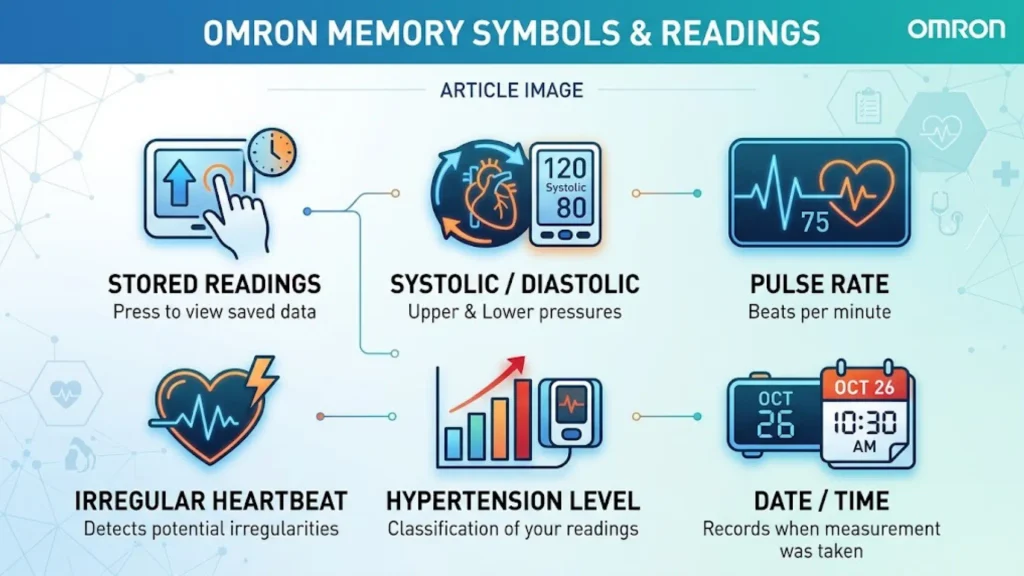
The memory function lets you review previous blood pressure measurements without writing down every result immediately. It can help you recognize patterns and prepare useful records for healthcare appointments.
Memory Symbol
The memory symbol appears when the monitor displays readings saved in its internal memory.
On the HEM-7183T1-FL/FLB, the monitor stores up to 30 readings for one user. The newest stored reading receives memory number 1. Older readings have higher numbers.
To view your readings:
- Press the Memory/Connection button as directed in the manual.
- Check the displayed memory number.
- Read the stored systolic and diastolic values.
- Review the pulse rate associated with the measurement.
- Continue through the stored readings using the button instructions.
The monitor may turn itself off after a period of inactivity. That’s normal and helps prevent unnecessary power use.
What Happens When the Memory Is Full?
When the monitor reaches its 30-reading capacity, new readings can replace the oldest stored measurements. The sync indicator warns that memory is almost full so you have an opportunity to transfer readings.
If you need a long-term record, don’t rely solely on the monitor’s internal memory. Transfer your readings to the app or maintain a separate log.
A simple record might look like this:
| Date | Time | Blood pressure | Pulse |
| October 20 | 7:30 AM | 124/79 mmHg | 70 BPM |
| October 20 | 7:35 AM | 121/77 mmHg | 68 BPM |
| October 20 | 8:00 PM | 126/81 mmHg | 72 BPM |
These are illustrative values, not actual measurements or medical recommendations.
Recording the date and time makes it easier to compare readings taken under similar conditions.
Resetting the Monitor and Deleting Stored Readings
Resetting a blood pressure monitor and deleting app data aren’t necessarily the same operation.
Before restoring default settings, check the exact instructions for your model. A reset may remove stored information or change settings, depending on the device and procedure.
Remember these distinctions:
- Monitor memory: Readings stored directly on the blood pressure monitor.
- App history: Readings transferred to the OMRON connect app.
- Personal records: Measurements saved separately in a notebook or another recordkeeping system.
Don’t assume that deleting data from one location automatically deletes every copy elsewhere. Check the app’s data-management instructions before removing records you may need later.
OMRON Blood Pressure Monitor Error Messages and Troubleshooting
An error indicator doesn’t always mean the monitor is broken. Often, the problem involves cuff placement, movement, power, or connectivity.
Use the following troubleshooting guide for common issues. Always check the exact display and instructions in your model’s manual before attempting a reset or repair.
| Problem | Possible cause | Recommended action |
| Loose cuff indicator | Cuff isn’t wrapped correctly | Reapply the cuff snugly |
| Movement error | Talking or moving during measurement | Rest briefly and repeat while still |
| Irregular heartbeat symbol | Irregular rhythm detected or movement interference | Repeat carefully and seek medical advice if it recurs |
| Low battery indicator | Batteries are running low | Replace batteries when necessary |
| Monitor won’t turn on | Depleted batteries or incorrect installation | Check battery condition and polarity |
| Reading won’t transfer | Bluetooth or app connection problem | Check pairing and app instructions |
| Air leakage | Damaged cuff or tubing | Inspect the cuff and replace damaged components |
| Unexpected readings | Poor technique or normal variability | Review posture, rest, cuff fit, and timing |
How to Fix an Incorrect Cuff Placement Error
Start by checking the cuff rather than assuming the monitor has failed.
- Make sure the cuff fits your upper-arm circumference.
- Place it on bare skin.
- Follow the alignment instructions in the manual.
- Ensure the air plug is properly connected.
- Keep your arm supported at heart level.
- Repeat the measurement after resting.
If the cuff has a tear, the air tube is damaged, or air escapes during inflation, stop using the damaged component and consult OMRON support about an appropriate replacement.
How to Fix an OMRON Bluetooth Connection Error
If the monitor measures blood pressure but the app doesn’t receive the reading, the measurement function may still be working normally.
Try these steps:
- Check whether Bluetooth is enabled on your smartphone.
- Open the OMRON connect app and review its connection instructions.
- Confirm that the monitor is paired with the intended phone.
- Keep the devices near each other during transfer.
- Check whether the app requests any additional permissions or updates.
- Follow the official troubleshooting procedure if the connection still fails.
Don’t assume a successful blood pressure measurement means the reading has also been saved in the app. Check the app’s history to confirm the transfer.
What If Your OMRON Monitor Shows an Unfamiliar Error?
Different models can use different error codes and troubleshooting procedures. A code found in another OMRON manual may not apply to your device.
Record the exact message, check the relevant manual, and follow the specified instructions. If the problem continues, contact an authorized OMRON dealer or the manufacturer’s customer support service.
Don’t disassemble the monitor, modify the pressure sensor, or attempt electrical repairs yourself.
How to Read an OMRON Blood Pressure Monitor Correctly
Understanding the display is only part of accurate home blood pressure monitoring. Your posture, cuff placement, and preparation can affect the result.
Understand the Two Numbers
A reading such as 120/80 mmHg contains two measurements:
- 120 systolic: Arterial pressure when the heart contracts.
- 80 diastolic: Arterial pressure while the heart relaxes between beats.
The abbreviation mmHg means millimeters of mercury, a traditional unit used to measure pressure.
The monitor’s hypertension indicator uses its programmed threshold. Your healthcare professional may assess your results using additional clinical criteria and your personal circumstances.
Understand Your Pulse Reading
The pulse reading reports your heart rate in beats per minute. It isn’t included in the systolic or diastolic value.
For example, a display might show 120/80 mmHg and a pulse of 74 BPM. These numbers describe blood pressure and heart rate separately.
When Should You Pay Attention to a High Reading?
A high-reading indicator deserves attention, but it doesn’t automatically mean you have a medical emergency.
Repeat the measurement correctly and record the result. If readings remain elevated, contact your healthcare professional for advice.
Very high readings require more urgent attention. A reading above 180 systolic and/or 120 diastolic should be repeated after at least one minute. If it remains that high, contact a healthcare professional immediately. If you have symptoms such as chest pain, breathing difficulty, weakness, vision changes, or trouble speaking, call emergency services.
Why One Reading Doesn’t Tell the Whole Story
Blood pressure changes naturally. A stressful morning, recent exercise, caffeine, pain, or an uncomfortable sitting position can affect your results.
That’s why a series of measurements taken under consistent conditions is usually more useful than one isolated number.
Don’t stop prescribed medication or change your dose based on a single reading or an on-screen symbol.
How to Get Accurate Readings With an OMRON Monitor
Good technique helps reduce avoidable measurement errors. Follow these steps whenever you measure your blood pressure at home.
Prepare Before Measuring
For a reliable measurement:
- Avoid caffeine, smoking, and exercise for at least 30 minutes beforehand.
- Empty your bladder.
- Sit quietly for at least five minutes.
- Choose a calm environment.
- Avoid taking a reading immediately after physical activity or a stressful event.
Follow your monitor’s instructions and any specific guidance provided by your healthcare professional.
Sit and Position Your Arm Correctly
Your position affects how accurately the monitor measures blood pressure.
- Sit in a chair with your back supported.
- Place both feet flat on the floor.
- Keep your legs uncrossed.
- Place the cuff on your bare upper arm.
- Rest your arm on a table or other support.
- Keep the middle of the cuff near heart level.
Don’t let your arm hang unsupported. Avoid talking, texting, or watching something that makes you move during the measurement.
Wait Between Measurements
The HEM-7183T1-FL/FLB manual recommends waiting two to three minutes between measurements. This allows the arteries to return toward their pre-measurement state. Some people may need a longer interval.
Take repeated measurements according to your healthcare professional’s instructions and record the results. Avoid repeatedly measuring out of anxiety without a clear plan.
Understand Factors That Affect Blood Pressure
Several factors can influence your results:
- Stress or anxiety
- Recent exercise
- Caffeine and nicotine
- Alcohol consumption
- Talking during measurement
- Incorrect cuff placement
- Unsupported arm position
- Insufficient rest
- Different measurement times
Consistent technique helps you distinguish genuine changes from measurement-related variation.
OMRON Device Safety and Regulatory Symbols
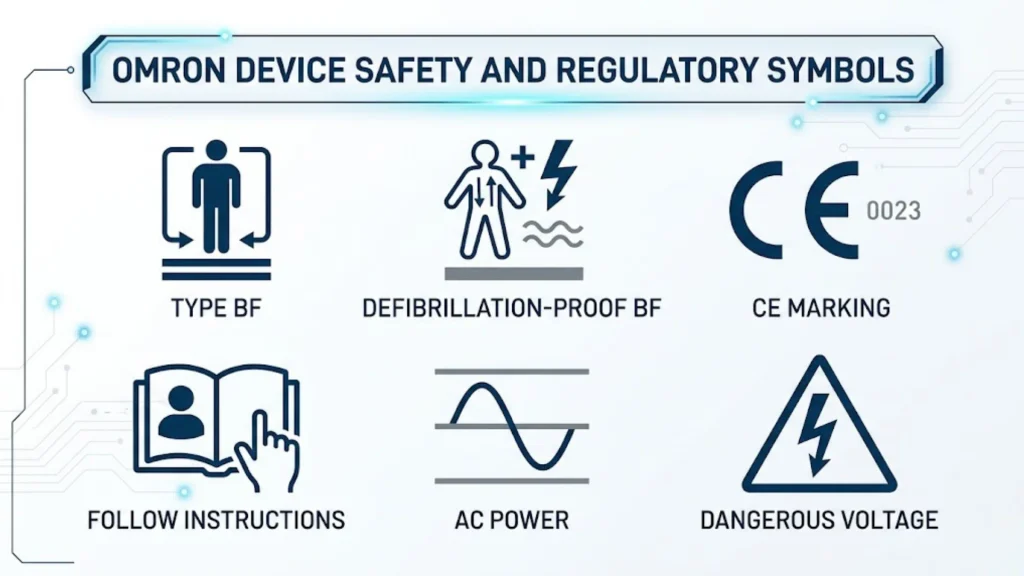
In addition to display indicators, your monitor may carry symbols on its casing, packaging, adapter, or instruction manual. These markings describe safety requirements, product identification, or disposal instructions.
They aren’t the same as the symbols that appear while measuring blood pressure.
Type BF Applied Part Symbol
The Type BF symbol identifies an electrical safety classification for an applied part of medical equipment.
For a blood pressure monitor, the cuff contacts the user’s arm during measurement. The classification relates to protection against electrical hazards, not to blood pressure levels or the accuracy of a reading.
CE Marking and Medical Device Identification
The CE marking, where present, indicates that a product meets applicable European Union requirements for which the marking is required.
Other product markings may identify the manufacturer, model, serial number, or medical device status. These details help with traceability and customer support.
A regulatory mark doesn’t guarantee that every reading will be accurate under every condition. Correct cuff fit and proper measurement technique remain important.
IP Ratings and Water Protection
An IP rating describes specified protection against solid objects and water under defined test conditions.
The HEM-7183T1-FL/FLB documentation lists an IP21 classification for the monitor and IP22 for the AC adapter.
These ratings don’t mean the equipment is waterproof. Keep the monitor and adapter away from water and follow the cleaning and storage instructions.
Serial Numbers and Product Identification
Product labels may include the model number, serial number, manufacturing details, or other identification codes.
These details are useful when:
- Downloading the correct instruction manual.
- Checking accessory compatibility.
- Contacting customer support.
- Requesting warranty service.
- Reporting a product issue.
Keep the product information available, but don’t share serial numbers publicly unless necessary.
Electrical and Disposal Symbols
Other markings may identify electrical ratings, adapter requirements, or disposal instructions.
For example, a crossed-out wheeled bin generally indicates that the product shouldn’t be disposed of with ordinary household waste where applicable electronic-waste rules require separate collection.
Follow local electronic waste disposal rules and the instructions provided with your device.
OMRON HEM-7183T1-FL vs. HEM-7183T1-FLB: Symbol and Feature Differences
The HEM-7183T1-FL and HEM-7183T1-FLB are closely related automatic upper-arm blood pressure monitors. Their included accessories differ, so it’s important to check which model you own.
| Feature | HEM-7183T1-FL | HEM-7183T1-FLB |
| Measurement type | Automatic upper-arm blood pressure | Automatic upper-arm blood pressure |
| Bluetooth connectivity | Yes | Yes |
| Internal memory | Up to 30 readings | Up to 30 readings |
| Cuff wrap guide | Yes | Yes |
| Trend indicator | Yes | Yes |
| Irregular heartbeat detection | Yes | Yes |
| Hypertension indicator | Yes | Yes |
| Included HHP-BH01 AC adapter | No | Yes |
| Specified HEM-FL31 cuff | Check the package and model documentation | Included according to the model documentation |
The official product pages and instruction manual provide the model-specific details.Why does the model number matter? An accessory that comes with one model may be optional for another. The same applies to replacement cuffs, adapters, and certain display features across the wider OMRON product range.
Before ordering an accessory or following a troubleshooting guide, confirm the full model number printed on your monitor.
How to Clean and Maintain an OMRON Blood Pressure Monitor
Regular maintenance helps keep your monitor in good condition. It also reduces the chance that damaged accessories or poor storage will interfere with use.
Cleaning the Monitor and Cuff
Follow the cleaning instructions in your model’s manual. In general, use a soft cloth and only the cleaning solution permitted by the manufacturer.
Keep these precautions in mind:
- Don’t immerse the monitor or cuff in water.
- Don’t spray liquid directly into the device.
- Avoid abrasive cleaners and harsh solvents.
- Don’t pull sharply on the air tube.
- Allow cleaned components to dry as instructed before storing them.
- Don’t attempt to open or repair the monitor yourself.
The cuff contains components used to inflate and measure pressure. Damage can affect operation, so inspect it periodically.
Store the Monitor Properly
Keep your monitor in a clean, dry location away from direct sunlight, excessive heat, moisture, and physical impacts.
Avoid wrapping the air tube tightly or placing heavy objects on the cuff. Remove the batteries if you won’t use the device for an extended period, following the manual’s instructions.
When Should You Contact OMRON Support?
Contact the manufacturer or an authorized dealer if:
- The display repeatedly shows errors despite correct use.
- The cuff or air tube is damaged.
- The monitor doesn’t power on with correctly installed, fresh batteries.
- The adapter or connector appears damaged.
- You suspect the device is no longer working properly.
- You need a compatible replacement cuff or adapter.
Don’t attempt to calibrate or repair the monitor using unofficial instructions. Ask the manufacturer about inspection, servicing, or replacement options.
Frequently Asked Questions About OMRON Symbols
What do the symbols on an OMRON blood pressure monitor mean?
OMRON display symbols communicate measurement status, cuff fit, battery condition, Bluetooth connectivity, stored readings, and potential measurement problems. Their exact meanings depend on the model. Check your instruction manual if a symbol doesn’t match this glossary.
What does the heart symbol mean on an OMRON monitor?
The flashing heartbeat symbol indicates that the monitor is detecting heartbeats during measurement. It doesn’t automatically indicate a heart problem. The separate irregular heartbeat symbol reports a detected rhythm variation.
What does the irregular heartbeat symbol mean?
It means the monitor detected a rhythm variation that met its detection criteria during measurement. Movement can also trigger the indicator. Repeat the measurement with correct technique and consult your healthcare professional if it appears repeatedly.
What does the cuff error symbol mean?
The cuff wrap guide indicates that the cuff hasn’t been applied correctly when the loose-cuff indicator appears. Reapply it snugly to your bare upper arm, check its alignment, and repeat the measurement.
What does the high blood pressure symbol mean on an OMRON monitor?
On the HEM-7183T1-FL/FLB, the hypertension symbol appears when systolic pressure reaches 135 mmHg or diastolic pressure reaches 85 mmHg. It’s a high-reading indicator, not a diagnosis.
What does the flashing Bluetooth symbol mean?
Its meaning depends on the specific Bluetooth indicator. The Bluetooth ON symbol relates to wireless connectivity and reading transfer, while the Bluetooth OFF symbol indicates that Bluetooth is disabled. The sync symbol flashes when stored memory is almost full.
What does the low battery symbol mean?
The flashing low battery symbol means the batteries are running low. The depleted battery symbol indicates that replacement is needed. Follow the manual when replacing all four AA batteries.
How do I fix an OMRON blood pressure monitor error?
Start by checking cuff placement, movement, battery condition, and the air tube connection. For Bluetooth problems, check your phone’s settings and the OMRON connect app. Follow the exact instructions for your model if the error persists.
How do I view stored blood pressure readings?
Press the Memory/Connection button as described in your manual. The HEM-7183T1-FL/FLB stores up to 30 readings for one user, with the most recent reading numbered 1.
How do I connect my OMRON monitor to the OMRON connect app?
Install the compatible app, enable Bluetooth on your smartphone, and follow the app’s instructions to add and pair your monitor. Confirm that the readings appear in the app after transferring them.
How do I reset an OMRON blood pressure monitor?
The reset procedure depends on the model. Consult the exact instruction manual before restoring default settings because the procedure may affect stored information or settings.
Where can I find the correct OMRON instruction manual?
Start with the official OMRON Healthcare product support website or the product support page for your region. Search for the full model number printed on your device.
For the HEM-7183T1-FL and HEM-7183T1-FLB, you can also consult the available instruction manual.
Conclusion
Understanding your OMRON blood pressure monitor symbols helps you interpret readings, correct cuff placement problems, and recognize when the device needs attention. The heartbeat, hypertension, irregular heartbeat, battery, Bluetooth, and memory indicators each serve a different purpose.
For the HEM-7183T1-FL and HEM-7183T1-FLB, the most useful habits are simple: apply the cuff correctly, sit quietly, check your readings, and transfer stored data before older measurements are overwritten.
Remember that a monitor symbol isn’t a substitute for medical advice. If readings remain high or an irregular heartbeat indicator appears repeatedly, discuss the results with your healthcare professional. When an unfamiliar symbol appears, consult the manual for your exact model rather than relying on instructions intended for another OMRON device.

Hello, I’m Rowan Sinclair, a passionate writer and lifelong admirer of the wisdom found in great quotes. I believe that words have the ability to inspire change, spark creativity, and connect people across cultures and generations.
I enjoy writing about motivational quotes, famous sayings, and lessons from history’s most influential thinkers. Every article I create is driven by my desire to help readers discover meaningful insights that they can apply to their own lives.
When I’m not writing, I spend my time reading biographies, exploring classic literature, and collecting memorable quotes that deserve to be shared with the world.
I am the author of Voices That Inspire and A Collection of Timeless Thoughts, two books that celebrate the enduring power of words and the stories behind them.
 Asher Monroe
 Sienna Brooks