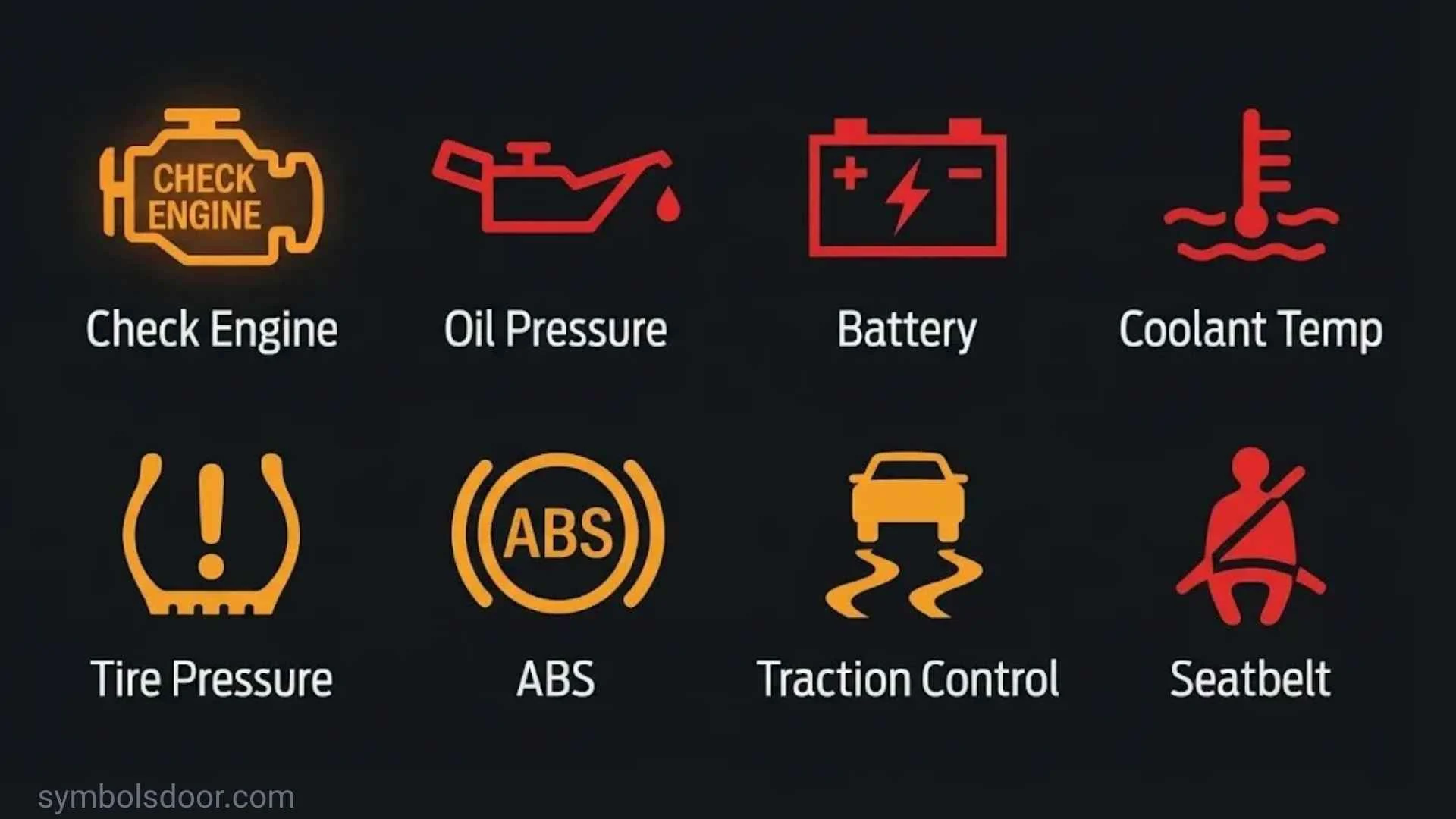
Ford dashboard warning lights help you understand what’s happening inside your vehicle. Some symbols indicate normal operation, while others alert you to problems that need attention. Whether you drive a Ford F-150, Escape, Explorer, Mustang, Edge, or Maverick, knowing these symbols can help you make safer decisions and avoid expensive repairs.
However, not every illuminated dashboard light signals a serious problem. A green indicator might simply show that your headlights are active. A yellow engine symbol could point to an emissions issue, while a red oil pressure warning may require you to stop immediately.
This guide explains Ford dashboard warning lights, their meanings, common causes, and recommended actions. You’ll also learn how to distinguish warning lamps from indicator lights, understand BLIS notifications, troubleshoot persistent alerts, and find the correct information in your Ford Owner’s Manual.
Because Ford uses different instrument clusters and technologies across its vehicles, some symbols vary by model, year, engine, and equipment. Always check your specific owner’s manual before making a repair decision.
Understanding Ford Dashboard Warning Lights and Indicator Symbols
Your Ford’s instrument cluster communicates important information through illuminated symbols, warning messages, and audible alerts. These notifications help you monitor the engine, brakes, electrical system, tires, lighting, and driver assistance features.
Understanding the difference between warning lights and indicator lights makes these notifications easier to interpret.
What Are Ford Dashboard Warning Lights?
Ford dashboard warning lights are visual alerts that notify you when a vehicle system detects a problem or an operating condition that needs attention.
For example, the oil pressure warning light may illuminate when the engine isn’t receiving adequate lubrication. Similarly, the brake system warning lamp can indicate an engaged parking brake or a problem within the braking system.
These warnings help you recognize potential mechanical or electrical problems before they become more serious.
Common warning light categories include:
- Engine and emissions system warnings
- Engine oil pressure alerts
- Coolant temperature warnings
- Battery and charging system notifications
- Brake system warnings
- Tire pressure monitoring alerts
- Airbag and restraint system warnings
- Steering system notifications
- Transmission temperature alerts
- Driver assistance system malfunctions
Some warnings appear temporarily when you switch on the ignition. Others remain illuminated until you correct the underlying condition or have the vehicle inspected.
What Are Ford Indicator Lights?
Ford indicator lights show when a vehicle feature, operating mode, or assistance system is active.
Unlike warning lamps, these indicators don’t necessarily signal a malfunction. They simply tell you that a particular function is working or available.
For example, a blue headlight symbol indicates that your high-beam headlights are switched on. A green turn signal symbol flashes when you activate the corresponding turn signal.
Common dashboard indicator lights include:
- Turn signal indicators
- High-beam headlight indicators
- Low-beam lighting indicators
- Cruise control indicators
- Traction control activity indicators
- Lane-keeping system indicators
- Four-wheel-drive mode indicators
- Auto Start-Stop status indicators
- Adaptive cruise control indicators
Some indicators can also flash when a system actively responds to changing driving conditions.
Warning Lights vs. Indicator Lights: What’s the Difference?
Although both appear on your dashboard, warning lights and indicator lights serve different purposes.
| Feature | Warning Lights | Indicator Lights |
| Main purpose | Identify a problem or important condition | Show feature activation or operating status |
| Common colors | Red, amber, or yellow | Green, blue, white, or other model-specific colors |
| Typical examples | Check engine, oil pressure, brake warning | Turn signals, high beams, cruise control |
| Driver response | Check the warning and take appropriate action | Understand which feature is active |
| Urgency | Depends on the warning | Usually informational |
For example, a flashing traction control indicator may show that the system is actively reducing wheelspin. However, a continuously illuminated traction control warning may indicate a system fault or disabled feature.
The important distinction: A dashboard symbol tells you something about your vehicle, but its color, behavior, and accompanying message determine what you should do next.
Ford Dashboard Warning Light Colors and Their Meanings
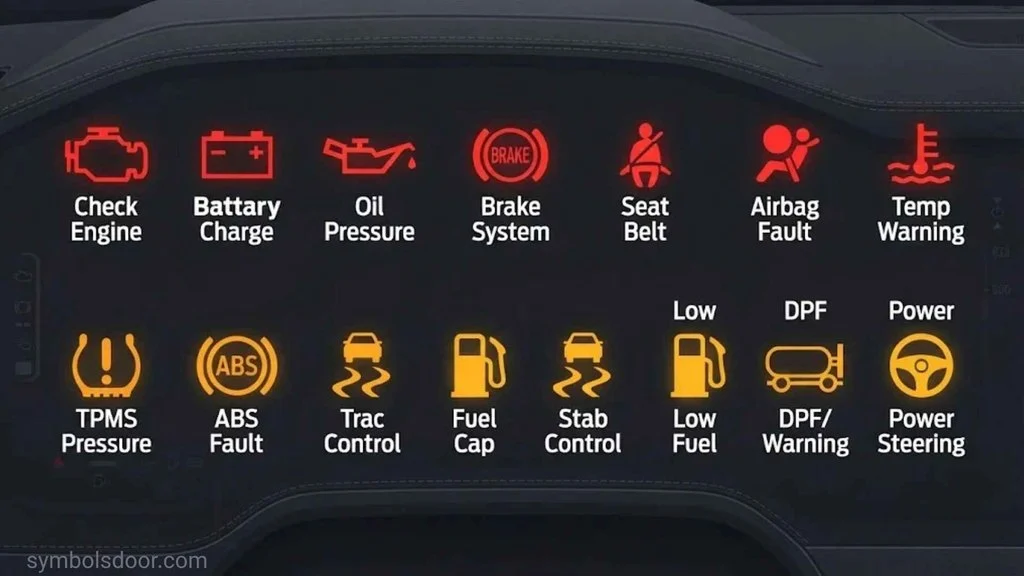
The color of a dashboard warning lamp provides an important clue about its urgency. Ford vehicles generally use familiar automotive warning colors, although exact colors and meanings depend on the model.
Red Ford Dashboard Warning Lights
Red warning lights generally indicate serious conditions that require immediate attention.
Depending on the symbol, you may need to stop driving, park safely, or switch off the engine.
Common red warnings include:
- Engine oil pressure warning
- Engine coolant temperature warning
- Brake system warning
- Seat belt warning
- Battery charging system warning on applicable models
For example, if the engine oil pressure warning illuminates while driving, safely pull over and switch off the engine as soon as possible. Continuing to drive with inadequate oil pressure can cause severe internal engine damage.
Never assume a red warning is harmless simply because your vehicle still drives normally.
Yellow or Amber Ford Dashboard Warning Lights
Yellow and amber Ford warning lights generally indicate a problem that needs attention but doesn’t always require an immediate stop.
Common examples include:
- Check engine light
- ABS warning light
- Tire pressure warning light
- Traction control warning
- Powertrain malfunction indicator
- Diesel particulate filter warning on equipped models
A steady amber check engine light often allows you to drive cautiously to a suitable repair facility if the vehicle runs normally.
However, a flashing check engine light can indicate an active misfire that may damage the catalytic converter. Reduce engine load and seek assistance promptly.
Green Ford Dashboard Indicator Lights
Green indicators usually confirm that a vehicle feature is active.
Common examples include:
- Turn signal indicators
- Cruise control status
- Exterior lighting indicators
- Lane assistance status on certain models
- Some four-wheel-drive operating indicators
A green indicator generally doesn’t require repair. Still, you should understand what it represents so you don’t mistake an active feature for a warning.
Blue Ford Dashboard Indicator Lights
Blue dashboard indicators commonly relate to vehicle lighting or operating conditions.
The most familiar example is the high-beam indicator.
When this symbol appears, your high-beam headlights are active. Switch to low beams when approaching other traffic or following another vehicle closely.
White Ford Dashboard Indicator Lights
White indicators generally provide information about vehicle functions, system availability, or selected settings.
Their meanings can differ between Ford models and instrument cluster designs.
For instance, some vehicles use white symbols to show that a driver assistance feature is available but hasn’t been activated.
Always check the corresponding symbol in your Owner’s Manual rather than assuming every white indicator has the same meaning.
Ford Dashboard Warning Lights and Their Meanings
The following reference guide covers common Ford dashboard symbols and meanings. It explains what each warning generally indicates, possible causes, and the action you should take.
Remember that the descriptions are general. Your vehicle’s exact warning message and Owner’s Manual take priority.
| Ford warning light | Meaning | Recommended action |
| Check engine | Engine or emissions system fault | Arrange a diagnostic inspection |
| Oil pressure | Low engine oil pressure | Stop safely and switch off the engine |
| Coolant temperature | Engine overheating | Stop safely and allow the engine to cool |
| Battery | Charging system problem | Reduce unnecessary electrical use and seek assistance |
| Brake system | Parking brake engaged or brake system warning | Check the parking brake and brake system |
| ABS | Anti-lock braking system fault | Arrange an inspection |
| Tire pressure | One or more tires may have low pressure | Check and adjust tire pressure |
| Airbag | Supplemental restraint system fault | Arrange professional inspection |
| Power steering | Steering assistance fault | Drive cautiously only if safe and seek service |
| Transmission temperature | Transmission overheating | Stop safely and follow the vehicle’s instructions |
| Traction control | System activity or malfunction | Check whether the light flashes or stays on |
| Low fuel | Fuel level is low | Refuel soon |
| Washer fluid | Washer fluid level is low | Refill the reservoir |
| Door ajar | A door or other monitored opening isn’t properly closed | Stop and secure the opening |
Check Engine Light
The check engine light is one of the most recognizable Ford dashboard warning symbols. It usually appears as an amber engine-shaped icon.
This warning indicates that the engine control system has detected a problem involving engine performance, emissions, or related components.
Possible causes include:
- Faulty oxygen sensor
- Loose or damaged fuel cap on applicable models
- Misfiring spark plugs
- Ignition coil problems
- Mass airflow sensor malfunction
- Fuel system problems
- Catalytic converter issues
- Evaporative emissions system leaks
The light’s behavior matters.
A steady check engine light generally indicates a fault that needs diagnosis. If your vehicle runs smoothly, you may be able to drive cautiously to a repair facility.
A flashing check engine light is more urgent. It often indicates an engine misfire that can overheat and damage the catalytic converter.
Avoid hard acceleration and heavy engine loads. If the engine shakes, loses power, or runs roughly, stop somewhere safe and arrange assistance.
A diagnostic scanner can retrieve the stored diagnostic trouble codes (DTCs) to help identify the affected system.
Engine Oil Pressure Warning Light
The engine oil pressure warning usually appears as a red oil-can symbol.
It indicates that engine oil pressure has dropped below the required operating level. This is different from a routine oil change reminder or a low oil level notification.
Possible causes include:
- Insufficient engine oil
- Oil leaks
- Faulty oil pressure sensor
- Damaged oil pump
- Blocked oil pickup
- Internal engine wear
If this warning appears while driving, pull over safely and switch off the engine.
Don’t continue driving just because the engine sounds normal. Low oil pressure can quickly damage bearings, crankshafts, and other internal components.
After switching off the engine, allow it to settle before checking the oil level according to your Owner’s Manual.
If the level is low, use the specified oil to bring it within the recommended range. However, adding oil won’t solve every pressure problem.
If the warning remains illuminated, don’t restart or drive the vehicle until a qualified technician investigates it.
Engine Coolant Temperature Warning Light
The coolant temperature warning symbol indicates that the engine is overheating or its temperature has exceeded the acceptable operating range.
Depending on the Ford model, this symbol may appear as a red thermometer above wavy lines.
Common causes include:
- Low coolant level
- Coolant leaks
- Faulty radiator fan
- Damaged thermostat
- Water pump failure
- Restricted radiator
- Cooling system problems
Overheating can damage cylinder heads, head gaskets, and other engine components.
If the warning appears, find a safe place to stop. Switch off the engine when instructed by your vehicle’s warning message.
Never remove a hot coolant reservoir cap. Pressurized coolant can escape and cause serious burns.
Allow the engine to cool before checking the coolant level. If you notice steam, major coolant leakage, or repeated overheating, arrange professional assistance.
Battery and Charging System Warning Light
The battery warning symbol usually looks like a rectangular battery with positive and negative terminals.
Although drivers often associate it with a weak battery, the warning usually points to a charging system problem.
Possible causes include:
- Alternator malfunction
- Damaged battery cables
- Loose electrical connections
- Faulty charging system components
- Drive belt problems on applicable engines
- Battery condition or monitoring system faults
When the charging system stops working correctly, your vehicle may begin relying on stored battery power.
Eventually, electrical systems may stop operating properly.
If the light appears while driving, turn off unnecessary electrical accessories when safe. Arrange an inspection as soon as possible.
If the vehicle shows additional warnings, loses power, or begins running poorly, pull over safely and seek assistance.
Brake System Warning Light
The brake warning symbol is commonly displayed as an exclamation mark inside a circle or a similar brake-related icon.
Depending on the vehicle, it may illuminate when:
- The parking brake is engaged.
- Brake fluid is below the required level.
- The braking system detects a malfunction.
- Another brake-related condition requires attention.
Start by checking whether the parking brake is fully released.
If the warning remains illuminated, check your Owner’s Manual for the exact message and recommended action.
A low brake fluid level can indicate a leak or excessive brake component wear. Either condition needs attention.
If the brake pedal feels soft, sinks toward the floor, or requires unusual pressure, don’t continue driving.
Your braking system isn’t something to gamble with. Arrange professional assistance.
Anti-Lock Braking System (ABS) Warning Light
The ABS warning symbol commonly displays the letters ABS inside a circle.
The Anti-Lock Braking System helps prevent the wheels from locking during hard braking. This allows the driver to maintain better steering control under suitable conditions.
If the ABS warning remains illuminated, the anti-lock braking function may be unavailable.
Possible causes include:
- Faulty wheel speed sensor
- Damaged sensor wiring
- ABS module malfunction
- Damaged tone ring
- Electrical connection problems
An ABS warning doesn’t automatically mean the regular braking system has stopped working.
However, normal braking and anti-lock braking are different functions. Your vehicle may retain conventional braking while losing ABS assistance.
If the red brake warning appears alongside the ABS warning, stop safely and have the braking system inspected.
Tire Pressure Monitoring System (TPMS) Warning Light
The TPMS warning symbol usually resembles a horseshoe-shaped tire with an exclamation mark.
It alerts you when one or more tires may have pressure below the recommended level.
Low tire pressure can affect:
- Steering response
- Braking distance
- Fuel economy
- Tire temperature
- Tire lifespan
- Vehicle stability
Check all tires when they’re cold and compare their pressure with the recommended figures on the driver’s door-jamb label.
Don’t use the maximum pressure printed on the tire sidewall as your normal inflation target.
A flashing TPMS light that later stays illuminated often indicates a monitoring system malfunction rather than simply low tire pressure.
Possible causes include a failed pressure sensor, damaged sensor, or system communication issue.
After correcting tire pressure, some Ford models automatically update the warning after driving. Others may require a specific reset procedure.
Airbag and Supplemental Restraint System Warning Light
The airbag warning symbol indicates a possible problem with the Supplemental Restraint System (SRS).
This system may include:
- Front airbags
- Side airbags
- Curtain airbags
- Seat belt pretensioners
- Crash sensors
- Airbag control modules
When the warning remains illuminated, one or more restraint components may not operate as intended during a collision.
Possible causes include damaged wiring, sensor problems, module faults, or connector issues.
Don’t attempt to repair airbag wiring yourself. Some components contain safety systems that require specialized handling.
Arrange a professional inspection promptly.
Power Steering Warning Light
The power steering warning indicates a possible problem with the steering assistance system.
Many modern Ford vehicles use electric power-assisted steering rather than a traditional hydraulic pump.
When assistance becomes unavailable, steering may require noticeably more effort, especially at low speeds.
Possible causes include:
- Electrical supply problems
- Steering angle sensor faults
- Electric steering motor problems
- Control module faults
- Wiring or connector damage
If steering becomes unusually heavy or unpredictable, slow down carefully and stop somewhere safe.
Have the system checked before continuing normal driving.
Transmission Temperature Warning Light
Some Ford vehicles display a transmission temperature warning when the transmission becomes too hot.
This can happen under demanding operating conditions, including:
- Heavy towing
- Driving uphill for extended periods
- Excessive stop-and-go traffic
- Carrying heavy loads
- Transmission cooling system problems
Excessive transmission heat can affect fluid performance and damage internal components.
Follow the message displayed by your vehicle. Depending on the model, you may need to stop, shift into Park, or allow the transmission to cool.
Don’t ignore repeated temperature warnings. Arrange an inspection if they return during normal driving.
Electronic Stability Control and Traction Control Warning Light
Ford vehicles use stability and traction control technologies to help drivers maintain control.
These systems monitor wheel speed and other vehicle data to identify conditions that may cause wheelspin or instability.
A flashing traction control symbol often means the system is actively intervening.
For example, if you accelerate on a wet road and one wheel begins spinning, the system may reduce engine torque or apply braking to improve traction.
A continuously illuminated warning can indicate that the system has been switched off or detected a fault.
Check the instrument cluster message and consult your manual before assuming the system has failed.
Diesel Particulate Filter (DPF) Warning Light
The DPF warning applies to Ford diesel vehicles equipped with a diesel particulate filter.
This filter captures soot particles from diesel exhaust gases. Under suitable operating conditions, the system burns accumulated soot through a process called regeneration.
The DPF warning may appear when soot accumulation reaches a level that requires attention.
Possible causes include:
- Frequent short journeys
- Repeated interrupted regeneration
- Extended low-speed driving
- Sensor or exhaust system problems
Follow the regeneration instructions in your specific Owner’s Manual.
Don’t assume every Ford diesel uses the same procedure. Some vehicles require specific driving conditions, while others may need professional service.
Glow Plug Warning Light
Diesel Ford vehicles may display a coil-shaped glow plug symbol.
When you switch on the ignition, the glow plug system helps warm the combustion chambers for easier cold starting.
The light normally turns off when the system completes its preheating cycle.
However, a flashing glow plug indicator or an accompanying engine warning may indicate a fault in the engine management or glow plug system.
Consult the vehicle’s manual and arrange a diagnostic inspection when necessary.
Low Fuel Warning Light
The low fuel warning symbol indicates that the fuel level has reached the reserve range.
The remaining driving distance depends on several factors, including:
- Fuel tank capacity
- Current fuel consumption
- Road conditions
- Traffic
- Driving style
- Vehicle load
Don’t rely on a fixed distance after the warning appears.
Refuel as soon as practical. Regularly running a vehicle with very little fuel can also increase the risk of fuel delivery problems in some circumstances.
Washer Fluid Warning Light
The washer fluid warning symbol indicates that the windshield washer reservoir needs attention.
The system uses washer fluid to remove dirt, dust, and road grime from the windshield.
When the fluid runs low, visibility may become worse, especially during bad weather or on dusty roads.
Refill the reservoir with a suitable washer fluid. Avoid using products that can damage the system or freeze under your local weather conditions.
Door Ajar and Seat Belt Warning Lights
These indicators help you confirm that important safety conditions are met.
A door ajar symbol indicates that a monitored door, liftgate, or other opening may not be fully closed.
The seat belt warning reminds occupants to fasten their seat belts.
Before driving, check the instrument cluster and make sure all doors and monitored openings are secure.
Ford Dashboard Indicator Lights and Their Meanings
Not every illuminated symbol on your Ford dashboard indicates a fault. Many Ford indicator lights simply show that a vehicle feature is switched on or operating.
Understanding these symbols helps you recognize normal vehicle behavior and identify unusual notifications.
Turn Signal and Hazard Warning Indicators
The left and right arrow symbols represent your turn signals.
When you activate the left or right turn signal, the corresponding arrow flashes on the instrument cluster.
The hazard warning indicators flash together when you activate the hazard lights.
If a turn signal flashes much faster than usual, a bulb or lighting circuit may have a problem. Some newer vehicles use LED lighting, so the exact behavior can differ.
Check the exterior lights if you notice unusual flashing.
High Beam Indicator Light
The high-beam indicator appears as a blue headlight symbol with horizontal lines.
It illuminates when your high-beam headlights are active.
High beams improve visibility on dark roads, especially when no street lighting is available. However, they can temporarily blind drivers approaching from the opposite direction.
Switch to low beams when approaching other vehicles or following traffic closely.
Headlight and Exterior Lighting Indicators
Ford instrument clusters may display symbols related to exterior lighting functions.
These can include:
- Parking lights
- Low-beam headlights
- Automatic headlights
- Front fog lights
- Rear fog lights on equipped models
Some vehicles also display lighting-related messages when a bulb fails or a lighting function becomes unavailable.
Check your headlight switch and exterior lights if an unexpected notification appears.
Daytime Running Lights (DRL) Indicator
Daytime running lights (DRLs) help make your vehicle more visible to other road users during daylight.
Depending on your Ford model, DRLs may operate automatically when the vehicle is running and certain conditions are met.
They aren’t necessarily a replacement for regular headlights at night. DRLs may not activate your taillights, so use the appropriate headlight setting in darkness or poor visibility.
Your Owner’s Manual explains the available lighting modes and controls.
Cruise Control Indicator
The cruise control indicator shows the operating status of your vehicle’s cruise control system.
Depending on the instrument cluster, you may see a symbol when the system is switched on or when you set a cruising speed.
Some Ford models distinguish between standby and active cruise control.
Remember that cruise control doesn’t replace your responsibility to monitor traffic, maintain a safe following distance, and control the vehicle.
Adaptive Cruise Control Indicator
Adaptive cruise control uses sensors to help maintain a selected speed and following distance.
Depending on the system, it can automatically adjust your vehicle’s speed when traffic ahead slows down.
Its dashboard indicators may show:
- System availability
- Cruise control activation
- Selected following distance
- Vehicle detection
- System limitations or faults
If the system displays a sensor obstruction message, check the relevant radar or camera area for dirt, snow, or other obstructions.
Never rely on adaptive cruise control as a substitute for active driving.
Auto Start-Stop Indicator
Ford vehicles equipped with Auto Start-Stop technology can temporarily switch off the engine when the vehicle stops under suitable conditions.
For example, the engine may stop while you’re waiting at a traffic light and restart when you release the brake or press the accelerator, depending on the vehicle design.
An indicator may show when the system is active, unavailable, or switched off.
Auto Start-Stop may not operate under certain conditions, including:
- Low battery charge
- Extreme cabin temperature demands
- Engine temperature outside the required range
- Certain steering or vehicle operating conditions
- Specific climate control requirements
A temporarily unavailable system doesn’t automatically mean something is broken.
Lane Keeping System Indicator
The Lane Keeping System uses a forward-facing camera to monitor road markings and support lane-related assistance.
Depending on the Ford model, the system may provide steering assistance, warnings, or vibration when it detects unintended lane departure.
Its indicators can communicate whether the feature is available, active, or unable to detect road markings.
Dirty windshields, faded lane markings, heavy rain, and poor visibility can affect system performance.
Keep your attention on the road. Lane assistance doesn’t replace proper steering control.
Four-Wheel Drive and AWD Indicators
Ford trucks and SUVs equipped with four-wheel-drive or all-wheel-drive systems may display symbols showing the selected driving mode.
Depending on the vehicle, these indicators may include:
- 2H
- 4H
- 4L
- AWD
- Lock or terrain mode indicators
The exact modes vary by model.
A flashing four-wheel-drive indicator may mean that the system is changing modes or has detected a problem.
Check the vehicle’s display message before attempting another mode change. Some systems require the vehicle to meet specific speed, transmission, or operating conditions.
Parking Assist and Rear View Camera Indicators
Parking assistance indicators show when the vehicle’s parking sensors or camera-based assistance features are available.
These systems help detect obstacles around the vehicle and provide visual or audible notifications.
Possible alerts include:
- Rear parking sensor activity
- Front parking sensor activity
- Camera unavailable messages
- Sensor obstruction warnings
- Parking assistance faults
Dirt, mud, ice, and snow can interfere with sensor operation.
Clean the relevant sensor areas carefully. If the warning remains, arrange an inspection.
Ford BLIS and Cross Traffic Alert Warning Indicators
Ford offers several driver assistance technologies designed to improve awareness around the vehicle.
Two important examples are BLIS (Blind Spot Information System) and Cross Traffic Alert.
These features can help drivers recognize nearby vehicles that may be difficult to see using mirrors alone.
What Is BLIS (Blind Spot Information System)?
BLIS stands for Blind Spot Information System.
It monitors designated blind spot areas beside your vehicle and alerts you when another vehicle enters a monitored zone.
Depending on the Ford model, BLIS uses radar sensors positioned around the rear of the vehicle.
When the system detects a vehicle in the monitored area, an indicator illuminates in the corresponding side view mirror.
For example, if another vehicle enters your left blind spot, the left mirror indicator may illuminate.
This gives you an additional warning before changing lanes.
However, BLIS doesn’t detect every object or traffic situation. Its coverage depends on sensor placement, vehicle speed, and system limitations.
Always check your mirrors and blind spots before changing lanes.
What Does the Yellow BLIS Light on a Ford Side Mirror Mean?
The yellow or amber BLIS indicator light on a Ford side mirror generally warns that another vehicle has entered the monitored blind spot area.
It doesn’t automatically mean the system has malfunctioned.
Here’s how to understand common BLIS behavior:
| BLIS behavior | General meaning |
| Mirror indicator illuminates | A vehicle has entered the monitored blind spot |
| Indicator remains off | No vehicle is currently detected in the monitored area |
| BLIS unavailable message | The system cannot operate normally |
| Sensor obstruction message | Something may be blocking the sensor |
| System fault message | The vehicle may need professional inspection |
Depending on the model, the indicator may illuminate differently when the system detects traffic during specific driving conditions.
Ford explains that BLIS uses radar technology to monitor adjacent traffic and provides a warning through the side mirror. You can read more in the official Ford BLIS technology guide.
Cross Traffic Alert Indicators
Cross Traffic Alert helps drivers detect approaching vehicles when reversing out of a parking space or driveway.
For example, imagine backing out between two large SUVs. Your view of approaching traffic may be limited.
Cross Traffic Alert monitors the area behind your vehicle and can provide a warning when it detects approaching traffic from either side.
Depending on the vehicle, the system may use:
- Side mirror warning indicators
- Audible warning tones
- Instrument cluster messages
Some versions can detect approaching bicycles or other road users, depending on the system design.
However, sensor coverage has limitations. Obstacles, narrow parking angles, and certain environmental conditions can affect detection.
Why Is the BLIS or Cross Traffic Alert Light Not Working?
If your Ford displays a BLIS or Cross Traffic Alert malfunction message, several conditions may be responsible.
Common possibilities include:
- Dirt covering the rear sensors
- Snow, mud, or ice obstructing sensor areas
- Damaged rear bumper or sensor housing
- Electrical connection problems
- Sensor malfunction
- System calibration issues
Start by checking the rear sensor areas and removing visible dirt or debris.
If the message remains after cleaning, contact a Ford Dealer or qualified technician.
Don’t rely on a malfunctioning blind spot monitoring system to judge whether a lane change or reversing maneuver is safe.
Ford Maverick Dashboard Symbols and Power Outlet Indicator
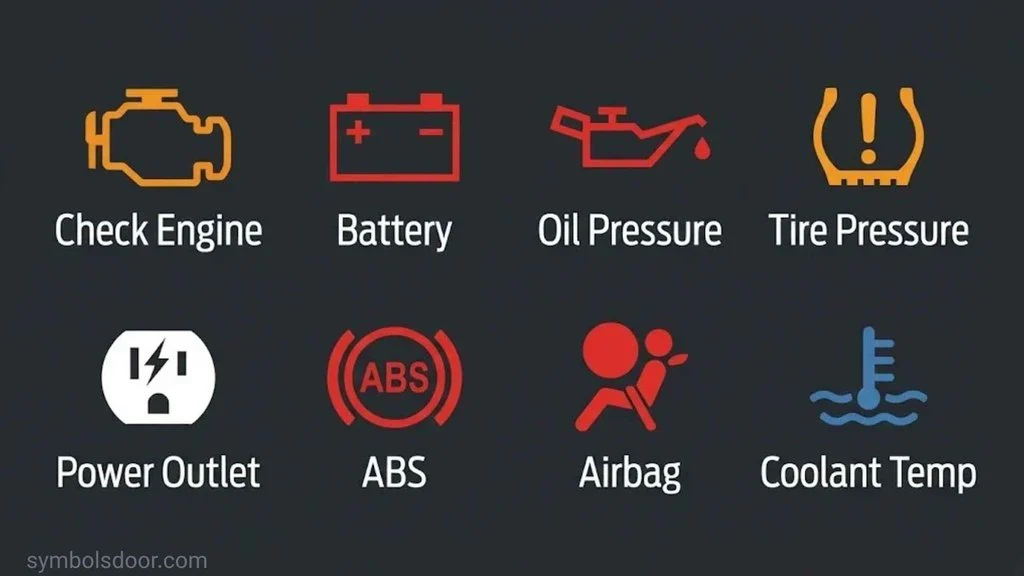
The Ford Maverick uses an instrument cluster that communicates vehicle information through warning lights, status indicators, and dashboard messages.
Its available symbols depend on the model year, engine, trim, and optional equipment.
Drivers should pay particular attention to engine warnings, tire pressure notifications, brake alerts, and hybrid system messages on equipped models.
What Does the Ford Maverick Power Outlet Indicator Light Mean?
The Ford Maverick power outlet indicator light relates to the operation or status of an equipped power outlet system.
However, the exact meaning depends on the outlet type and model year.
Maverick configurations can include different electrical outlets and power capabilities. For example, certain versions offer a 120-volt, 400-watt AC outlet.
A power outlet status notification should not automatically be confused with an engine or electrical charging warning.
If an outlet stops working, consider these possible causes:
- The connected device exceeds the outlet’s power rating.
- The outlet protection system has interrupted power.
- The vehicle’s operating conditions don’t allow outlet operation.
- A fuse or electrical component has failed.
- The connected device or cable is damaged.
Check the outlet label and the vehicle’s manual for its specific power limits and operating instructions.
Never assume every Maverick outlet supports the same electrical load.
Ford Maverick Dashboard Warning Lights
Common Maverick dashboard warnings may relate to:
- Check engine system
- Engine oil pressure
- Coolant temperature
- Battery or charging system
- Brake system
- Tire pressure monitoring
- Airbag system
- Traction control
- Hybrid system components on hybrid models
Hybrid Mavericks may also display additional notifications related to high-voltage electrical components and hybrid operation.
If a warning appears, read the accompanying message carefully.
For example, a hybrid system warning may require a different diagnostic procedure from a conventional engine warning.
Use the correct model-year Owner’s Manual rather than relying on a general Ford dashboard symbol chart.
Ford Vehicle Lighting System Symbols and Controls
Ford’s lighting system includes exterior and interior lights that support visibility, safety, and convenience.
Although these lights aren’t all dashboard warning symbols, understanding their controls helps you interpret lighting-related notifications.
Headlights and Taillights
Headlights help illuminate the road ahead, while taillights make your vehicle visible to drivers behind you.
Ford vehicles may offer several lighting settings:
- Off
- Parking lights
- Low-beam headlights
- Automatic headlights
- High beams
- Fog lights where equipped
Automatic headlight systems use available sensors and vehicle settings to determine when exterior lighting should activate.
If your dashboard displays a headlight or bulb warning, check the relevant exterior lights.
A failed headlight or taillight can reduce visibility and make your vehicle harder for others to recognize.
Interior Dome Lights
Dome lights illuminate the cabin when you enter or exit the vehicle.
Depending on your Ford model, you may control them through:
- Individual light switches
- Door-activated settings
- Interior lighting controls
- Touch-sensitive switches
If a dome light remains on unexpectedly, check the door switches and interior lighting settings.
Some vehicles also provide delayed lighting that keeps the cabin illuminated briefly after you close the doors.
Ambient Lighting
Ambient lighting adds soft illumination to selected areas inside the cabin.
Depending on the vehicle and trim, it may illuminate the footwells, door panels, cupholders, or dashboard areas.
Some Ford models allow drivers to adjust ambient lighting colors and brightness through the infotainment system.
The general process may involve:
- Open the vehicle’s settings menu.
- Select the lighting or ambient lighting option.
- Choose an available color.
- Adjust brightness if the feature supports it.
- Save or confirm the setting.
The available colors and menu locations vary by vehicle.
Ambient lighting is a comfort feature, not a warning system. Its color should not be interpreted using the normal red, amber, and green dashboard warning conventions.
Daytime Running Lights
Daytime running lights improve your vehicle’s visibility during daylight hours.
Many Ford models activate them automatically when the engine or vehicle operating system is running and the required conditions are met.
However, daytime running lights don’t necessarily provide the same illumination as regular headlights.
In particular, don’t assume your taillights are illuminated simply because the front DRLs are on.
Use the correct exterior lighting setting when driving at night, through tunnels, or during poor weather.
Lights and Bulbs Warning Messages
Some Ford models display messages when the lighting system detects a fault.
These notifications may involve:
- Headlight bulbs
- Taillight bulbs
- Brake lights
- Turn signal lamps
- Exterior lighting circuits
If an exterior light stops working, inspect the bulb or lighting assembly where appropriate.
LED lighting units may require replacement of a complete assembly or professional diagnosis rather than a simple bulb change.
Why Do Ford Dashboard Warning Lights Turn On After Starting?
Many drivers become concerned when several dashboard symbols illuminate after switching on the ignition.
In most cases, this is completely normal.
Ford vehicles perform an initial system check to confirm that important warning lamps and vehicle systems are functioning correctly.
Normal Dashboard Light Check During Engine Startup
When you turn the ignition on, several warning lights may illuminate briefly.
These can include:
- Check engine light
- Oil pressure warning
- Battery warning
- ABS warning
- Airbag warning
- Brake system warning
The instrument cluster uses this process to check warning indicators and communicate vehicle status.
After the engine starts, many of these lights should switch off if their corresponding systems operate normally.
However, some indicators remain illuminated because their features are active or because specific operating conditions haven’t been met.
For example, the seat belt warning may remain active until the driver fastens the seat belt.
Warning Lights That Stay On After Starting
A warning light that remains illuminated after startup deserves attention.
The reason depends on the symbol.
For example:
- A persistent oil pressure warning may indicate inadequate engine lubrication.
- A check engine light may indicate an engine or emissions fault.
- An ABS warning may indicate a problem with anti-lock braking.
- An airbag warning may indicate a restraint system malfunction.
- A battery warning may indicate a charging system problem.
Read the instrument cluster message and check your Owner’s Manual.
Don’t assume a warning is harmless just because the vehicle starts normally.
Why Multiple Dashboard Warning Lights Appear at Once
Sometimes several Ford dashboard warning lights appear simultaneously.
This can happen when one underlying fault affects multiple vehicle systems.
Common possibilities include:
Weak battery: Low battery voltage can interfere with electronic modules and trigger several warning notifications.
Charging system problems: An alternator or charging fault may cause electrical systems to behave unpredictably.
Electrical connection issues: Loose battery terminals, damaged wiring, or poor ground connections can affect several components.
Communication faults: Modern vehicles use electronic control modules that exchange information. A communication problem can trigger multiple dashboard messages.
Sensor problems: A failed sensor may affect more than one vehicle function.
When multiple warnings appear together, don’t replace parts randomly. A proper diagnostic inspection can help identify the underlying problem.
What to Do When a Ford Dashboard Warning Light Stays On
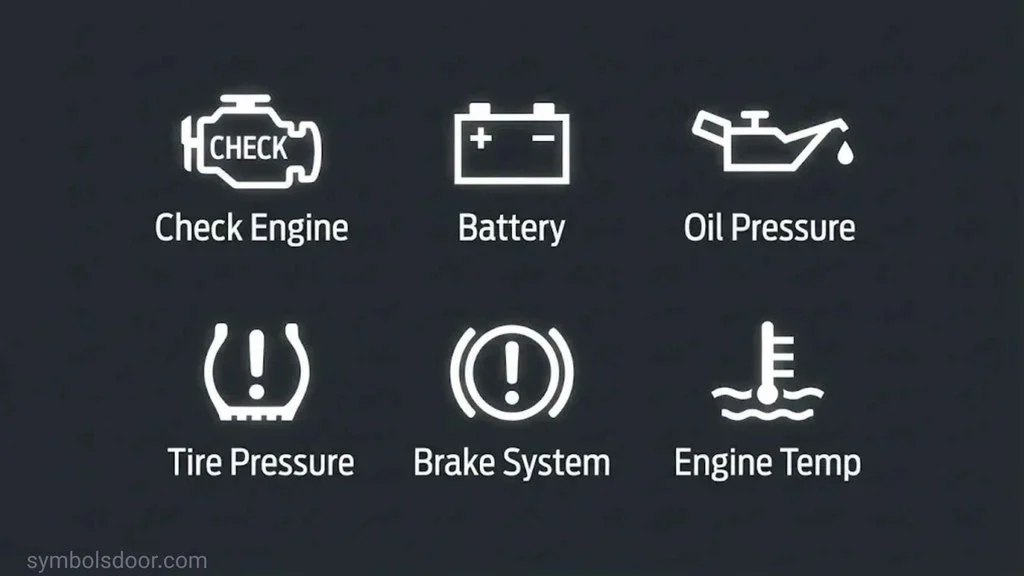
A persistent warning light doesn’t always mean your vehicle needs an expensive repair. However, ignoring it can turn a minor problem into a major one.
Follow these steps to understand the warning and decide what to do.
Identify the Warning Symbol
Start by identifying the exact symbol or dashboard message.
Check the following:
- Is the light red, amber, yellow, green, or blue?
- Does the symbol flash or remain illuminated?
- Did it appear while starting or driving?
- Is there an accompanying message?
- Did you notice unusual engine noise, vibration, or steering changes?
Take a photograph of the instrument cluster if you need to show the notification to a technician.
The exact symbol matters because similar-looking dashboard alerts can represent different problems.
Determine Whether It Is Safe to Continue Driving
Not every warning requires the same response.
Use the following general guide:
| Warning condition | Recommended response |
| Red oil pressure warning | Stop safely and switch off the engine |
| Engine overheating | Stop safely and follow the vehicle’s instructions |
| Serious brake system warning | Stop safely and arrange assistance |
| Flashing check engine light | Reduce engine load and seek prompt assistance |
| Steady check engine light | Arrange diagnostic inspection |
| Amber TPMS warning | Check tire pressure as soon as safely possible |
| ABS warning only | Have the system inspected and drive cautiously if normal braking remains available |
| Green feature indicator | Check which vehicle function is active |
This table provides general guidance, not a replacement for your vehicle’s specific instructions.
If you experience reduced braking, steering problems, smoke, steam, or unusual engine noises, prioritize safety over reaching your destination.
Check for Obvious Vehicle Problems
After parking safely, you can perform a few basic checks.
Depending on the warning, inspect:
- Engine oil level
- Coolant level after the engine cools
- Tire pressure
- Visible fluid leaks
- Battery connections
- Exterior lights
- Washer fluid level
- Doors and tailgate
Never touch hot engine components or open a pressurized cooling system.
Also, don’t attempt electrical repairs without understanding the vehicle’s safety procedures.
Arrange a Professional Vehicle Inspection
Some warnings require specialized equipment and technical knowledge.
Contact a Ford Dealer or qualified repair facility when:
- A warning remains illuminated.
- Multiple warning lights appear together.
- The vehicle loses power.
- The engine runs roughly.
- The braking system behaves unusually.
- A safety system becomes unavailable.
- The same dashboard notification repeatedly returns.
A technician can inspect the affected system, retrieve diagnostic information, and recommend the correct repair.
Ford Dashboard Warning Light Troubleshooting and Diagnostic Codes
Modern Ford vehicles use electronic control modules to monitor important systems.
These modules collect information from sensors and record certain detected faults.
Understanding how vehicle diagnostics work can help you make better repair decisions.
What Are Diagnostic Trouble Codes (DTCs)?
Diagnostic trouble codes (DTCs) are standardized or manufacturer-specific codes stored by vehicle control modules when they detect certain faults.
A diagnostic scanner can retrieve these codes through the vehicle’s diagnostic connection.
For example, a scanner might identify:
- Engine misfire information
- Oxygen sensor faults
- Emissions system problems
- ABS-related faults
- Transmission system issues
- Communication problems
A code provides a starting point for diagnosis. It doesn’t automatically identify the exact component that needs replacement.
For instance, an oxygen sensor-related code may result from a faulty sensor, damaged wiring, an exhaust leak, or another underlying problem.
A technician must interpret the code alongside live sensor readings and other diagnostic information.
How to Identify a Ford Vehicle Fault Code
You can use a compatible OBD-II diagnostic scanner to retrieve many engine and emissions-related codes.
A basic diagnostic process involves:
- Locate the vehicle’s diagnostic connector.
- Connect a compatible scanner.
- Follow the scanner’s instructions.
- Read the stored diagnostic trouble codes.
- Record the codes before clearing anything.
- Research the relevant system and arrange further testing.
Many vehicles manufactured for the US market have supported OBD-II diagnostics since the 1996 model year.
However, an ordinary engine code reader may not access every Ford system.
For example, advanced ABS, airbag, body control, and manufacturer-specific information may require a more capable diagnostic tool.
Can You Reset Ford Dashboard Warning Lights?
Some warning lights disappear automatically after the underlying problem has been corrected.
Others require a specific reset procedure or diagnostic confirmation.
For example, certain tire pressure monitoring systems update after you inflate the tires and drive under suitable conditions.
However, clearing a stored diagnostic code doesn’t repair the original fault.
Disconnecting the battery isn’t a reliable solution either. It may erase some settings or stored information without correcting the problem.
Before resetting a warning, understand why it appeared.
Fix the cause first. Clear the warning only when the correct procedure allows it.
When Should You Visit a Ford Dealer?
A Ford Dealer is a suitable option when your vehicle needs manufacturer-specific diagnostic information or repair procedures.
Consider professional service when:
- A red warning remains illuminated.
- The vehicle displays repeated powertrain warnings.
- An airbag or brake system fault appears.
- A hybrid or high-voltage system reports a malfunction.
- A driver assistance system repeatedly becomes unavailable.
- You cannot identify the warning through the Owner’s Manual.
For vehicles under warranty, an authorized service center can also help determine whether the issue may qualify for warranty coverage.
How to Find Ford Dashboard Light Meanings in the Owner’s Manual
One of the most reliable ways to identify a dashboard symbol is to consult the correct Ford Owner’s Manual.
Ford uses different instrument clusters and equipment across its vehicle lineup. A symbol in an older Escape may not appear in the same form on a newer F-150.
The manual explains the specific symbols, warning messages, and operating procedures for your vehicle.
Search for a Ford Owner’s Manual by VIN
A Vehicle Identification Number (VIN) is a unique 17-character identifier assigned to a vehicle.
It helps distinguish your vehicle from other examples of the same model.
You can generally find the VIN in locations such as:
- The driver’s side dashboard near the windshield
- The driver’s door-jamb label
- Vehicle registration documents
- Insurance paperwork
To locate the correct manual:
- Visit the official Ford Owner’s Manuals page.
- Follow the available vehicle identification or manual search options.
- Enter the requested vehicle information.
- Select the correct model and model year.
- Open the manual and search for the warning symbol or message.
The available lookup options can vary by region and website version.
Search Ford Manuals by Year and Model
If you don’t have your VIN available, you can look for the manual using your vehicle’s model and year.
For example, you might search for:
- 2024 Ford F-150 Owner’s Manual
- 2023 Ford Explorer Owner’s Manual
- 2025 Ford Maverick Owner’s Manual
- 2022 Ford Escape Owner’s Manual
- 2024 Ford Mustang Owner’s Manual
Once you open the correct manual, look for sections such as:
- Instrument cluster
- Warning lamps and indicators
- Information displays
- Vehicle maintenance
- Driver assistance systems
- Lighting controls
- Troubleshooting
Use the search function in the digital manual to find a particular symbol more quickly.
Check Ford Vehicle Health Alerts in the Ford App
The Ford app provides connected vehicle information and ownership features for supported vehicles.
Depending on your vehicle and available services, you may receive Vehicle Health Alerts that provide information about certain vehicle conditions.
These alerts can help you understand maintenance concerns and decide whether your vehicle needs attention.
The app may also provide access to:
- Vehicle status information
- Service history
- Maintenance notifications
- Recall information
- Roadside assistance
- Service appointment scheduling
- Remote vehicle features on supported models
To check a notification:
- Open the Ford app.
- Sign in to your Ford account.
- Select your connected vehicle.
- Look for available vehicle health notifications.
- Open the alert to read its explanation and recommended action.
Not every Ford vehicle supports every connected feature. Availability depends on the vehicle, market, connectivity equipment, and service requirements.
You can find additional details on the official Ford app page.
Remember that an app notification doesn’t replace a dashboard warning or professional inspection.
How to Contact Ford for Warning Light and Repair Assistance
If you can’t identify a warning or need technical assistance, Ford provides several support options.
The available contact methods vary by country and market.
Contact a Ford Dealer
An authorized Ford Dealer can help with vehicle inspections, diagnostics, maintenance, and repairs.
Before arranging an appointment, prepare the following information:
- Vehicle model
- Model year
- VIN
- Current mileage
- Warning light description
- Accompanying dashboard message
- Any unusual vehicle behavior
If possible, take a photograph of the warning.
This information helps the service team understand the problem before inspecting your vehicle.
You can use Ford’s regional website to locate an appropriate dealership or service center.
Ford Customer Relationship Center
The Ford Customer Relationship Center provides customer assistance for various ownership and vehicle-related questions in supported markets.
Depending on your location, you may be able to request help with:
- Vehicle information
- Owner’s Manual access
- Warranty questions
- Recall information
- Connected vehicle services
- Dealership assistance
Contact details and operating hours differ by country.
Use the official Ford website for your market rather than relying on an outdated contact number from another region.
Ford Live Chat and Online Support
Ford’s online support resources can help you find vehicle information without visiting a dealership.
Depending on availability, support options may include:
- Live Chat
- Online support forms
- Owner’s Manual downloads
- Vehicle maintenance information
- Recall lookup
- Dealer location tools
For the United States, start with Ford Support.
If you live outside the United States, use the official Ford website for your country to find the correct regional assistance options.
Frequently Asked Questions About Ford Dashboard Symbols and Warning Lights
What Do Ford Dashboard Warning Lights Mean?
Ford dashboard warning lights communicate vehicle conditions, system faults, and operating information.
Red warnings generally indicate more serious conditions, while amber or yellow warnings usually require attention. Green, blue, and white indicators commonly show that vehicle functions are active or available.
The exact meaning depends on the symbol and your Ford model.
What Is the Difference Between Ford Warning Lights and Indicator Lights?
Warning lights alert you to potential problems or important vehicle conditions.
Indicator lights show when features such as high beams, turn signals, cruise control, or driver assistance systems are operating.
Some indicators can also flash during normal system activity.
Why Do Ford Dashboard Lights Turn On When Starting the Vehicle?
Ford vehicles perform an initial instrument cluster and system check when you switch on the ignition.
Several warning lights may illuminate briefly before the engine starts.
They should generally turn off when the corresponding systems pass their checks. Any warning that remains illuminated needs attention according to the Owner’s Manual.
Why Is My Ford Warning Light Staying On?
A warning light may stay illuminated because the vehicle has detected an unresolved problem.
Common causes include low fluid levels, faulty sensors, electrical problems, engine faults, or system malfunctions.
Check the dashboard message and consult your Owner’s Manual. If the warning is serious or persists, arrange a professional inspection.
Can I Drive My Ford With a Yellow Warning Light?
Sometimes, yes. However, it depends on the warning and how the vehicle behaves.
A steady check engine light may allow cautious driving to a repair facility if the vehicle operates normally.
Other amber warnings may indicate problems that require immediate attention.
A flashing check engine light, unusual engine behavior, or additional serious warnings require a more urgent response.
Which Ford Dashboard Warning Lights Mean Stop Immediately?
Some warnings require you to stop safely and switch off the engine.
Important examples include:
- Engine oil pressure warnings
- Engine overheating warnings
- Serious brake system warnings
- Certain transmission temperature warnings
Always follow the accompanying dashboard message and vehicle-specific instructions.
What Does a Flashing Check Engine Light Mean on a Ford?
A flashing check engine light often indicates an active engine misfire.
An ongoing misfire can send unburned fuel into the exhaust system and damage the catalytic converter.
Avoid heavy acceleration and arrange prompt diagnostic assistance. If the engine shakes severely or loses power, stop safely.
What Does the Yellow BLIS Light on a Ford Side Mirror Mean?
The yellow or amber BLIS indicator generally warns that another vehicle has entered the monitored blind spot area.
It doesn’t automatically indicate a malfunction.
If your instrument cluster displays a BLIS fault or unavailable message, check for sensor obstructions and arrange an inspection if the notification remains.
How Do I Reset a Ford Dashboard Warning Light?
The correct reset method depends on the warning.
Some lights disappear after correcting the problem, while others require a specific vehicle procedure or diagnostic equipment.
Don’t simply disconnect the battery or erase fault codes without identifying the cause.
How Can I Find Dashboard Warning Light Meanings for My Ford Model?
Use the official Ford Owner’s Manual resource.
Search using your vehicle’s model and year or follow the available VIN-based lookup options.
The manual provides model-specific information about instrument cluster symbols, warning messages, and vehicle features.
Can the Ford App Identify Dashboard Warning Lights?
The Ford app provides Vehicle Health Alerts and other connected vehicle information on supported models.
These alerts can help explain certain vehicle conditions, but the app doesn’t necessarily identify every dashboard symbol.
For an exact explanation, consult your Owner’s Manual.
Where Can I Find My Ford Owner’s Manual?
Visit the official Ford Owner’s Manuals page.
Select your vehicle’s available identification details and open the corresponding digital manual.
You can then search for the instrument cluster section or a specific warning symbol.
Final Thoughts on Ford Dashboard Symbols and Warning Lights
Understanding Ford dashboard symbols and warning lights helps you recognize vehicle problems, monitor active features, and make better driving decisions.
A green turn signal indicator is usually normal. An amber check engine light needs investigation. A red oil pressure warning requires immediate attention because continued driving can cause serious engine damage.
The most important thing is to recognize the difference between normal operating indicators and genuine warning alerts.
When a symbol appears, check its color, behavior, and accompanying dashboard message. Then consult the correct Ford Owner’s Manual for your model and year.
Don’t ignore persistent warnings or attempt to reset them without understanding their cause.
With the right information and timely maintenance, you can keep your Ford operating safely and address problems before they become more expensive.

Hi, I’m Sienna Brooks, and I believe that the right words can inspire, comfort, and empower people at every stage of life. For as long as I can remember, I’ve been drawn to meaningful quotes and the stories behind them. I love curating collections of inspirational, motivational, and heartfelt quotes that resonate with readers around the world.
Through my writing, I strive to help others find encouragement, whether they’re celebrating life’s happiest moments or navigating its biggest challenges. I believe that wisdom is timeless, and I’m passionate about sharing words that leave a lasting impact.
I am the author of Reflections in Words and The Journey of Inspiration, two books dedicated to exploring the beauty and power of timeless quotes.
 Asher Monroe
 Rowan Sinclair Rowan Sinclair